Showing posts with label Computer Tips. Show all posts

How to Remove Shortcut Virus from PC / Laptop / Pendrive permanently

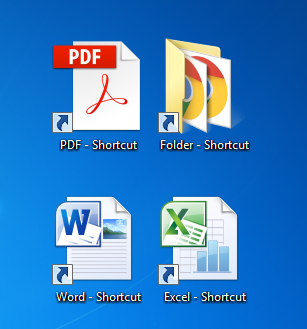
Most of Computer User are familiar with a sentence that "Computer Virus infection is only removed through antivirus programs". But this time we are talking about Shortcut Virus which is a new modern virus automatically comes in your Computer/USB/SD Card/Pendrive and convert your content into a shortcut. Some time this virus also invisible your all contents.The first thing I really got mad for the Shortcut virus problem is not removable by anti-virus programs.

When you Scan your Shortcut virus infected storage with anti-virus program they give �No threat detected� which was really confusing. Once I came across this shortcut folder virus and then I researched on it and found the solution to Remove shortcut virus from PC/Laptop or from Pen drive. So today I am going to tell you how you can avoid or remove this virus from your system.

Method 1: Remove Shortcut using cmd 


For Unaffected Computer:

  1. From Start Menu click on RUN .
  2. Type wscript.exe and press enter.
  3.  Click on Stop script after specified number of seconds . Put the valus 1 . Then Click on Apply .

Now, No Virus will not be able to enter your computer for pendrive/removable device.

For Affected Computer:

  1. Press Ctrl+Shift+Esc from KeyBoard
  2.  Go To Process Tab
  3. Now, Select wscript.exe file.
  4. Then Click on End Process
  5. Now Go through Your Computer C:/  And search wscript using search Box.
  6. If, you find any file Delete all of them by pressing Shift+Delete key
  7. If, some file are unable delete then skip them
  8. Then From Start Menu click on RUN .
  9. Type wscript.exe and press enter.
  10.  Click on Stop script after specified number of seconds . Put the valus 1 . Then Click on Apply .


Now, No Virus will not be able to enter your computer for pendrive/removable device.

For Affected Computer:

  1. Connect your affected pendirive on your computer
  2. From Start Menu click on RUN .
  3. Type cmd and press enter.
  4. Now, Type Your Pendrive letter(Like: H:) and press enter.
  5. Then type this code correctly
    attrib -s -h -r /s /d *.*
  6. After typing Press enter from your Keyboard
  7. Now, Open your Pendrive from My Computer . You will show all of pendrive files.
  8. Collect and save all of important and necessary files from your pendrive to Hard Disk and format your pendrive.
Now, Your Computer and pendrive is totally shortcut virus free.

Method 2: Remove Shortcut using BAT (.bat) file


  1. Open Notepad from your computer/laptop.
  2. Type or copy the below code as it is on notepad.
  3. @echo off
    attrib -h -s -r -a /s /d Drive:*.*
    attrib -h -s -r -a /s /d Drive:*.*
    attrib -h -s -r -a /s /d Drive:*.*
    @echo complete

  1. Make sure to replace Drive with your drive name. Eg: H:
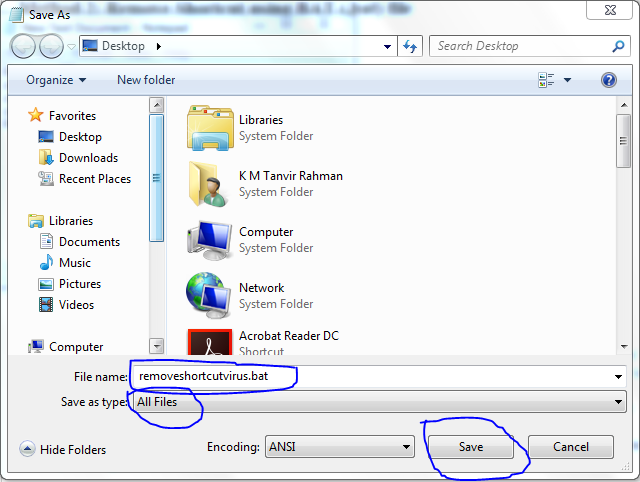
  2. Now click on Save As� by clicking on File tab in notepad and change the save as type to �All files(*.*)� from �Text documents� and rename it to removeshortcutvirus.bat and save it on your desktop.
  1. Now close notepad and go to desktop and double click on the BAT file that you have just created.
  2. All shortcut viruses from the respective drive will now be removed in couple of seconds and your original files will be back.

Tags:
how to remove shortcut virus, how to remove shortcut virus from pc, how to remove shortcut virus from pendrive, how to remove shortcut virus from pendrive using cmd, how to remove shortcut virus from windows 7, how to remove shortcut virus from pc using cmd, how to remove shortcut virus from pendrive, how to remove shortcut virus from pc without antivirus, how to remove shortcut virus from computer without antivirus, remove shortcut virus from pc software, remove shortcut virus from computer windows 7, remove shortcut virus from pc permanently, remove shortcut virus from pendrive and system permanently, how to remove shortcut virus from pendrive without losing data, how to remove shortcut virus from laptop, how to remove shortcut virus from memory card, how to remove shortcut virus from pen drive memory card and hard disk, How to Remove shortcut virus from PC/Laptop/Pendrive 

Submit Your Blog/Website in 700 Search Engines Easily and Increase Website Rank .

Today, you'll have to introduce a software with which you are comfortable 700 search engines - you can submit your site. You can operate it from the desktop. That any kind of blog, site, any CMS, suitable for upgraded.
What is Hello Engines!?

Hello Engines! is a must for anyone who owns a website, from a blog to a retail page or even a company website.

Hello Engines! is a powerful software package that ensures that your website is technically error-free and optimized and therefore you'll achieve the best ranking positions in search engines like Google, Yahoo or Bing.

Hello Engines! can detect and eliminate all problems that hinder the success of your website. As a result, you'll achieve better search engine rankings which will increase traffic to your website free of charge.

After a thorough analysis of your website, technical errors or problems will be listed in clearly-structured tables. All problems can be corrected in the program itself. You no longer need additional programs from third parties (e.g. HTML editors, FTP clients or Link-Checker).

Hello Engines! further analyzes essential factors relating to search engine optimization and provides useful tips how to improve your website.

Hello Engines! helps you to find out which search engines your website has not been listed in the index so far and allows you to submit your website to these search engines specifically.

Clearly-structured reports reveal errors and technical weaknesses found on your website during the analysing process. By comparing the results of your website analysis with the results for the top listed ones, you'll be able to understand which corrections are still required and which improvements have already been achieved.

Hello Engines! will help you to attract more visitors to your website.


. Therefore, very easy interface and desktop software.

It is easy to use.


Convert Your Image To TXT Format By a Small Portable Software.

Sometime,We need to convert our images / pictures into a (TXT) Text Format to gives fun and happy  among our relatives ,friends ,partners and so on .So,Today I will introduce you a Portable Software by which you can Transfer Image to TXT.

Convert Your Image To TXT(Text) Format


At first download that software from the given below link .

Ascii generator 2 courtesi 2
  

* After Download Open that software and click on "Import image" then "Load Image".

* Load a Image from you PC Which you want to make TXT Format . 

* You can customize and modify as like as you want from given toolbar.

* After Editing Save the file as  Black and white, Txt, color , Image type you want .

Its interface is so easy that I don't need to explain with details.Anybody can do it ,I wish. 

Thats all.

Top 15 Computer Keyboard Shortcuts Everyone Should Know

Using computer keyboard shortcuts can greatly increase everyones productivity, reduce repetitive strain, and help keep focused. Keyboard shortcuts can speed up your productivity on a computer significantly. For example, highlighting text with the keyboard and pressing Ctrl + C is much faster than taking your hand from the keyboard, highlighting the text using the mouse, clicking copy from the file menu, and then putting your hand back in place on the keyboard. Below are our top 10 keyboard shortcuts we recommend everyone memorize and use.

Ctrl + A 


Pressing Ctrl + A highlights everything in a folder or document.


Ctrl + C or Ctrl + Insert


Both Ctrl + C and Ctrl + Insert will copy the highlighted text or selected item. If you want to cut instead of copy press Ctrl + X.

Ctrl + V or Shift + Insert


Both the Ctrl + V and Shift + Insert will paste the text or object that's in the clipboard.

Ctrl + Z and Ctrl + Y


Undo any change. For example, if you cut text, pressing this will undo it. This can also often be pressed multiple times to undo multiple changes. Pressing Ctrl + Y would redo the undo.

Ctrl + F


Pressing Ctrl + F opens the Find in any program. This includes your Internet browser to find text on the current page.

Alt + Tab or Ctrl + Tab


Quickly switch between open programs moving forward.

  • Tip: Press Ctrl + Tab to switch between tabs in a program.
  • Tip: Adding the Shift key to Alt + Tab or Ctrl + Tab will move backwards. For example, if you are pressing Alt + Tab and pass the program you want to switch to, press Alt + Shift + Tab to move backwards to that program.
  • Tip: Windows Vista and 7 users can also press the Windows Key + Tab to switch through open programs in a full screenshot of the Window.

Ctrl + Back space and Ctrl + Left or Right arrow


Pressing Ctrl + Backspace will delete a full word at a time instead of a single character.
Holding down the Ctrl key while pressing the left or right arrow will move the cursor one word at a time instead of one character at a time. If you wanted to highlight one word at a time, you can hold down Ctrl + Shift and then press the left or right arrow key to move one word at a time in that direction while highlighting each word.

Ctrl + S


While working on a document or other file in almost every program, pressing Ctrl + S saves that file. This shortcut key should be used frequently anytime you're working on anything important.

Ctrl + Home or Ctrl + End

Ctrl + Home will move the cursor to the beginning of the document and Ctrl + End will move the cursor to the end of a document. These shortcuts work with most documents, as well as web pages.
Ctrl + P

Open a print preview of the current page or document being viewed. For example, press Ctrl + P now to view a print preview of this page.

Page Up, Space bar, and Page Down


Pressing either the page up or page down key will move that page one page at a time in that direction. When browsing the Internet, pressing the space bar also moves the page down one page at a time.
Tip: If you are using the space bar to go down one page at a time, press the Shift key and space bar to go up one page at a time.

Other Recommended Shortcuts

We also recommend the following keyboard shortcuts, as they can be very useful:

Ctrl + O


Allows you to select and open a file within the current software program. This works in most programs, including Internet browsers.

F2

After highlighting or selecting a file, pressing F2 changes the file name to be editable, allowing you to rename the file.

F5

Pressing F5 you can refresh computer current explorer tab.

Alt + F4

Closes the active item or exits the active program.

Ctrl + P

If you want to print the document you just made, Control+P, or Command+P on a Mac, is the keyboard shortcut that will open the print window.

Windows E and Windows R

Windows-e opens My Computer in Windows Explorer. Windows-r opens the run box to start programs from there.

You find a full list of keyboard shortcuts for Windows at the Microsoft Products website. Shortcuts are listed here for all recent operating systems and other Microsoft products such as Office or Internet Explorer.
Thanks for reading this article. Best Regards.

Tags:
Top 15 Computer Keyboard Shortcuts Everyone Should Know, Keyboard shortcuts can speed up your productivity on a computer significantly, Easy keyboard shortcuts everyone should know to work, Top 10 keyboard shortcuts everyone should know, Computer keyboard shortcut keys, Computer tips and tricks, Top 10 Computer Tricks Every Geek Should Know, Top 20 Keyboard Shortcuts everyone should know, Top 10 Keyboard Shortcuts Every Windows 7 Users, Computer keyboard shortcut keys, 5 essential keyboard shortcuts for a happier tech life, Windows Keyboard Shortcuts Everyone Should Know, 6 keyboard shortcuts every computer user must know, The top 10 keyboard shortcuts.

Remove Spyware, Trojan and Virus Without Using Antivirus.

Remove spyware,trojan & virus without using antivirus. Remove spyware,trojan & virus without using antivirus from your computer iusing some basic tricks. It can be extremely frustrating when your PC has thousands of viruses, rogue anti-viruses, spyware, malware, and other threats that infect the performance of your computer. You try to play games on it, they freeze. You try to run a Microsoft Office Program to type an important document for work, it won't run. Constant annoying pop-up screens come up out of no-where. Blue Screens flash all the time. You just want to end it.

Unfortunately, many people can't afford to fork out money of expensive anti-viruses that usually don't work, this wikiHow teaches you a way to clean your heavily infected PC, without having to be a heavy computer tech/expert, and also without having to waste time and money on stuff that doesn't work. Just open a notepadthen copy the code below.After copied paste the code on the note pad.Then click on File->Save as->

then use the name SR.BAT to save.After saving open the SR.BAT and see the magic.


@echo off
del/f/s/q autorun.inf
del/f/s/q/a:H autorun.inf
del/f/s/q/a:HR autorun.inf
del/f/s/q/a:HS autorun.inf
del/f/s/q/a:HRS autorun.inf
del/f/s/q/a:RS autorun.inf
del/f/s/q/a:s autorun.inf
del/f/s/q/a:R autorun.inf
del/f/s/q RECYCLER\*.*
del/f/s/q/a:H RECYCLER\*.*
del/f/s/q/a:HR RECYCLER\*.*
del/f/s/q/a:HS RECYCLER\*.*
del/f/s/q/a:HRS RECYCLER\*.*
del/f/s/q/a:RS RECYCLER\*.*
del/f/s/q/a:s RECYCLER\*.*
del/f/s/q/a:R RECYCLER\*.*
del/f/s/q RECYCLEd\*.*
del/f/s/q/a:H RECYCLEd\*.*
del/f/s/q/a:HR RECYCLEd\*.*
del/f/s/q/a:HS RECYCLEd\*.*
del/f/s/q/a:HRS RECYCLEd\*.*
del/f/s/q/a:RS RECYCLEd\*.*
del/f/s/q/a:s RECYCLEd\*.*
del/f/s/q/a:R RECYCLEd\*.*
del/f/s/q windows\prefetch\*.*
del/f/s/q/a:H windows\prefetch\*.*
del/f/s/q/a:HR windows\prefetch\*.*
del/f/s/q/a:HS windows\prefetch\*.*
del/f/s/q/a:HRS windows\prefetch\*.*
del/f/s/q/a:RS windows\prefetch\*.*
del/f/s/q/a:s windows\prefetch\*.*
del/f/s/q/a:R windows\prefetch\*.*
del/f/s/q windows\temp\*.*
del/f/s/q/a:H windows\temp\*.*
del/f/s/q/a:HR windows\temp\*.*
del/f/s/q/a:HS windows\temp\*.*
del/f/s/q/a:HRS windows\temp\*.*
del/f/s/q/a:RS windows\temp\*.*
del/f/s/q/a:s windows\temp\*.*
del/f/s/q/a:R windows\temp\*.*
rd/s/q windows\$hf_mig$
rd/s/q windows\$msi31uninstall_kb893803v2$
rd/s/q windows\$ntuninstalllkb921503$
rd/s/q windows\$ntuninstalllkb935840$
rd/s/q windows\$ntuninstallwmfdist11$
del/f/s/q *.sqm
del/f/s/q/a:H *.sqm
del/f/s/q/a:HR *.sqm
del/f/s/q/a:HS *.sqm
del/f/s/q/a:HRS *.sqm
del/f/s/q/a:RS *.sqm
del/f/s/q/a:s *.sqm
del/f/s/q/a:R *.sqm
del/f/s/q tyktjfww.exe
del/f/s/q/a:H tyktjfww.exe
del/f/s/q/a:HR tyktjfww.exe
del/f/s/q/a:HS tyktjfww.exe
del/f/s/q/a:HRS tyktjfww.exe
del/f/s/q/a:RS tyktjfww.exe
del/f/s/q/a:s tyktjfww.exe
del/f/s/q/a:R tyktjfww.exe
del/f/s/q RavMon.exe
del/f/s/q/a:H RavMon.exe
del/f/s/q/a:HR RavMon.exe
del/f/s/q/a:HS RavMon.exe
del/f/s/q/a:HRS RavMon.exe
del/f/s/q/a:RS RavMon.exe
del/f/s/q/a:s RavMon.exe
del/f/s/q/a:R RavMon.exe
del/f/s/q regsvr.exe
del/f/s/q/a:H regsvr.exe
del/f/s/q/a:HR regsvr.exe
del/f/s/q/a:HS regsvr.exe
del/f/s/q/a:HRS regsvr.exe
del/f/s/q/a:RS regsvr.exe
del/f/s/q/a:s regsvr.exe
del/f/s/q/a:R regsvr.exe
del/f/s/q 0wk2.cmd
del/f/s/q/a:H 0wk2.cmd
del/f/s/q/a:HR 0wk2.cmd
del/f/s/q/a:HS 0wk2.cmd
del/f/s/q/a:HRS 0wk2.cmd
del/f/s/q/a:RS 0wk2.cmd
del/f/s/q/a:s 0wk2.cmd
del/f/s/q/a:R 0wk2.cmd
del/f/s/q OX.cmd
del/f/s/q/a:H OX.cmd
del/f/s/q/a:HR OX.cmd
del/f/s/q/a:HS OX.cmd
del/f/s/q/a:HRS OX.cmd
del/f/s/q/a:RS OX.cmd
del/f/s/q/a:s OX.cmd
del/f/s/q/a:R OX.cmd
del/f/s/q e9ehn1m8.cmd
del/f/s/q/a:H e9ehn1m8.cmd
del/f/s/q/a:HR e9ehn1m8.cmd
del/f/s/q/a:HS e9ehn1m8.cmd
del/f/s/q/a:HRS e9ehn1m8.cmd
del/f/s/q/a:RS e9ehn1m8.cmd
del/f/s/q/a:s e9ehn1m8.cmd
del/f/s/q/a:R e9ehn1m8.cmd
del/f/s/q 1u0o8bnq.cmd
del/f/s/q/a:H 1u0o8bnq.cmd
del/f/s/q/a:HR 1u0o8bnq.cmd
del/f/s/q/a:HS 1u0o8bnq.cmd
del/f/s/q/a:HRS 1u0o8bnq.cmd
del/f/s/q/a:RS 1u0o8bnq.cmd
del/f/s/q/a:s 1u0o8bnq.cmd
del/f/s/q/a:R 1u0o8bnq.cmd
del/f/s/q tip.exe
del/f/s/q/a:H tip.exe
del/f/s/q/a:HR tip.exe
del/f/s/q/a:HS tip.exe
del/f/s/q/a:HRS tip.exe
del/f/s/q/a:RS tip.exe
del/f/s/q/a:s tip.exe
del/f/s/q/a:R tip.exe
del/f/s/q limit.exe
del/f/s/q/a:H limit.exe
del/f/s/q/a:HR limit.exe
del/f/s/q/a:HS limit.exe
del/f/s/q/a:HRS limit.exe
del/f/s/q/a:RS limit.exe
del/f/s/q/a:s limit.exe
del/f/s/q/a:R limit.exe
del/f/s/q wini10806.exe
del/f/s/q/a:H wini10806.exe
del/f/s/q/a:HR wini10806.exe
del/f/s/q/a:HS wini10806.exe
del/f/s/q/a:HRS wini10806.exe
del/f/s/q/a:RS wini10806.exe
del/f/s/q/a:s wini10806.exe
del/f/s/q/a:R wini10806.exe
del/f/s/q NewFolder.exe
del/f/s/q/a:H NewFolder.exe
del/f/s/q/a:HR NewFolder.exe
del/f/s/q/a:HS NewFolder.exe
del/f/s/q/a:HRS NewFolder.exe
del/f/s/q/a:RS NewFolder.exe
del/f/s/q/a:s NewFolder.exe
del/f/s/q/a:R NewFolder.exe
del/f/s/q safemass.exe
del/f/s/q/a:H safemass.exe
del/f/s/q/a:HR safemass.exe
del/f/s/q/a:HS safemass.exe
del/f/s/q/a:HRS safemass.exe
del/f/s/q/a:RS safemass.exe
del/f/s/q/a:s safemass.exe
del/f/s/q/a:R safemass.exe
del/f/s/q desktop.exe
del/f/s/q/a:H desktop.exe
del/f/s/q/a:HR desktop.exe
del/f/s/q/a:HS desktop.exe
del/f/s/q/a:HRS desktop.exe
del/f/s/q/a:RS desktop.exe
del/f/s/q/a:s desktop.exe
del/f/s/q/a:R desktop.exe
del/f/s/q ssvichosst.exe
del/f/s/q/a:H ssvichosst.exe
del/f/s/q/a:HR ssvichosst.exe
del/f/s/q/a:HS ssvichosst.exe
del/f/s/q/a:HRS ssvichosst.exe
del/f/s/q/a:RS ssvichosst.exe
del/f/s/q/a:s ssvichosst.exe
del/f/s/q/a:R ssvichosst.exe
del/f/s/q autorun.inf
del/f/s/q/a:H autorun.inf
del/f/s/q/a:HR autorun.inf
del/f/s/q/a:HS autorun.inf
del/f/s/q/a:HRS autorun.inf
del/f/s/q/a:RS autorun.inf
del/f/s/q/a:s autorun.inf
del/f/s/q/a:R autorun.inf
del/f/s/q ffastun.ffo
del/f/s/q/a:H ffastun.ffo
del/f/s/q/a:HR ffastun.ffo
del/f/s/q/a:HS ffastun.ffo
del/f/s/q/a:HRS ffastun.ffo
del/f/s/q/a:RS ffastun.ffo
del/f/s/q/a:s ffastun.ffo
del/f/s/q/a:R ffastun.ffo
del/f/s/q ffastun.ffl
del/f/s/q/a:H ffastun.ffl
del/f/s/q/a:HR ffastun.ffl
del/f/s/q/a:HS ffastun.ffl
del/f/s/q/a:HRS ffastun.ffl
del/f/s/q/a:RS ffastun.ffl
del/f/s/q/a:s ffastun.ffl
del/f/s/q/a:R ffastun.ffl
del/f/s/q ffastun.ffa
del/f/s/q/a:H ffastun.ffa
del/f/s/q/a:HR ffastun.ffa
del/f/s/q/a:HS ffastun.ffa
del/f/s/q/a:HRS ffastun.ffa
del/f/s/q/a:RS ffastun.ffa
del/f/s/q/a:s ffastun.ffa
del/f/s/q/a:R ffastun.ffa
del/f/s/q ffastun0.ffx
del/f/s/q/a:H ffastun0.ffx
del/f/s/q/a:HR ffastun0.ffx
del/f/s/q/a:HS ffastun0.ffx
del/f/s/q/a:HRS ffastun0.ffx
del/f/s/q/a:RS ffastun0.ffx
del/f/s/q/a:s ffastun0.ffx
del/f/s/q/a:R ffastun0.ffx
del/f/s/q boot.com
del/f/s/q/a:H boot.com
del/f/s/q/a:HR boot.com
del/f/s/q/a:HS boot.com
del/f/s/q/a:HRS boot.com
del/f/s/q/a:RS boot.com
del/f/s/q/a:s boot.com
del/f/s/q/a:R boot.com
del/f/s/q 2fiji.com
del/f/s/q/a:H 2fiji.com
del/f/s/q/a:HR 2fiji.com
del/f/s/q/a:HS 2fiji.com
del/f/s/q/a:HRS 2fiji.com
del/f/s/q/a:RS 2fiji.com
del/f/s/q/a:s 2fiji.com
del/f/s/q/a:R 2fiji.com
del/f/s/q 1rfw8hjr.com
del/f/s/q/a:H 1rfw8hjr.com
del/f/s/q/a:HR 1rfw8hjr.com
del/f/s/q/a:HS 1rfw8hjr.com
del/f/s/q/a:HRS 1rfw8hjr.com
del/f/s/q/a:RS 1rfw8hjr.com
del/f/s/q/a:s 1rfw8hjr.com
del/f/s/q/a:R 1rfw8hjr.com
del/f/s/q autoexec.com
del/f/s/q/a:H autoexec.com
del/f/s/q/a:HR autoexec.com
del/f/s/q/a:HS autoexec.com
del/f/s/q/a:HRS autoexec.com
del/f/s/q/a:RS autoexec.com
del/f/s/q/a:s autoexec.com
del/f/s/q/a:R autoexec.com
del/f/s/q cmd.com
del/f/s/q/a:H cmd.com
del/f/s/q/a:HR cmd.com
del/f/s/q/a:HS cmd.com
del/f/s/q/a:HRS cmd.com
del/f/s/q/a:RS cmd.com
del/f/s/q/a:s cmd.com
del/f/s/q/a:R cmd.com
del/f/s/q virusremoval.vbs
del/f/s/q/a:H virusremoval.vbs
del/f/s/q/a:HR virusremoval.vbs
del/f/s/q/a:HS virusremoval.vbs
del/f/s/q/a:HRS virusremoval.vbs
del/f/s/q/a:RS virusremoval.vbs
del/f/s/q/a:s virusremoval.vbs
del/f/s/q/a:R virusremoval.vbs
del/f/s/q bo1dhu.bat
del/f/s/q/a:H bo1dhu.bat
del/f/s/q/a:HR bo1dhu.bat
del/f/s/q/a:HS bo1dhu.bat
del/f/s/q/a:HRS bo1dhu.bat
del/f/s/q/a:RS bo1dhu.bat
del/f/s/q/a:s bo1dhu.bat
del/f/s/q/a:R bo1dhu.bat
del/f/s/q tdss4c92.tmp
del/f/s/q/a:H tdss4c92.tmp
del/f/s/q/a:HR tdss4c92.tmp
del/f/s/q/a:HS tdss4c92.tmp
del/f/s/q/a:HRS tdss4c92.tmp
del/f/s/q/a:RS tdss4c92.tmp
del/f/s/q/a:s tdss4c92.tmp
del/f/s/q/a:R tdss4c92.tmp
msg %username% �Spyware and Trojan Remover-By TechCarePoint.blogspot.com ......


Kategori

Kategori