Showing posts with label Flash. Show all posts

How To Add Animated Flash Clock To Your Blogger Blog

Animated Flash Clock To Your Blogger Blog

Hello! `How are you guys? here's the cool Clock.this tutorial will show you how to Add animated flash clock gadget your Blogger blog. A clock gives a beautiful look to a website. A clock is a necessity for a personal website, forum, blog etc.Isn�t it exciting when you get a highly quality flash Clock absolutely Free? you can add this flash animated clock your blog easily.i've tested this Flash Clock on internet explorer, mozzilla firefox & many other web browsers. it's very fast and fresh.You simply have to copy the code below each clock and add it to your blog.


How To Add Aniamted Flash Clock Widget To Blogger?

  • Choose a type of clock below
  • Provide Require widget title
  • Fill Height and Width of the Widget
  • Click on "Genetate" button
  • Finally click on "Add to Blogger" to add it to your blog.


Add Animated Flash Clock To Your Blogger blog


Now let's start adding it...

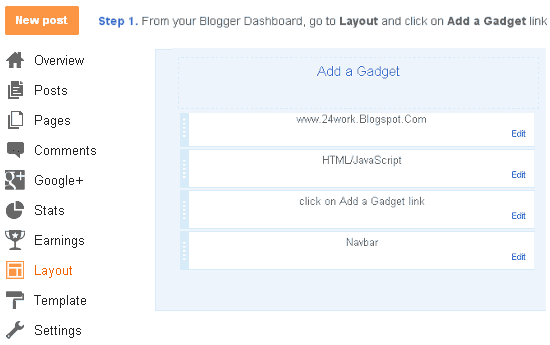
Step 1. Login to Your Blogger Account.Go to your Blogger Dashboard.Click on Layout tab from left pane and click on Add a Gadget link.
Blogger Tips And Tricks|Latest Tips For Bloggers

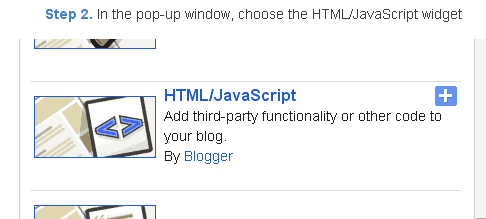
Step 2. After click on Add a Gadget link A pop-up box will open now
with many gadget list, Choose HTML/JavaScript from the gadget options by clicking the blue plus sign for that gadget.
Blogger Tips And Tricks|Latest Tips For Bloggers


Step 3. Select 'HTML/Javascript' and add the one of code given below.

Step 4. Now Click On Save 'JavaScript' You are done.


Happy blogging!


Special Thanks http://flash-clocks.com/ & http://flash2nd.blogspot.com/

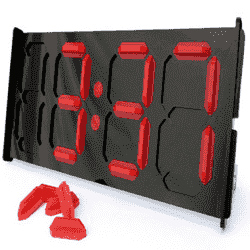
Picture From http://www.2dayblog.com/2009/10/19/manual-digital-clock/


Creative Kit photo editor works in Google+, if not in Picasa

This Quick-Tip is about using the Creative Kit, which has been giving me grief recently when I tried to use it from Picasa-web-albums.


Sept 2013 update:   Creative Kit has now been totally discontinued.   Use either Picasa-web-albums or the Google+ photo editor instead.


For ages, I've occasionally used the photo-editor in Picasa-web-albums (the online version of Picasa) to edit photos that I've already uploaded, and want to change without changing the URL.   This editor was originally Picnik - until Google sold that product and replaced it with Creative Kit a while ago.

This has sometimes been slow, which was annoying, but I put up with it because it was just so useful.

But recently it stopped working totally:  it would load, the progress-bar would get about half-way along the screen, and then hang, with a message:
We noticed Picnik is loading slowly. It�s possible waiting
may solve this issue. If you�re still having trouble:
[t1]   Click for Assistance�

Waiting never solved the problem for me (trust me, I tried), so eventually I tried the help-link, which went to this Picnik help page.

After following lots of the instructions, I finally found this helpful line in the Adope Flash Player re-installation instructions:
If you are using the Google Chrome browser, Adobe� Flash� Player is built-in but has been disabled. To enable Flash Player, follow the steps in this TechNote

Which sounded hopeful - it's only recently that I've switched to use Chrome all the time, so maybe this was the problem.   But it didn't help - despite what they said, Flash was enabled in my setup.

Eventually, it occurred to me that since I have a Google Plus profile, my albums are now accessible via the Plus interface too.   So I went there, chose Photos, found the album, opened a photo, chose creative kit ... held my breath for a few seconds ... and the editor opened up and worked nicely.

I'd still like to get this working from Picasa, because it just looks so much nicer from the small screen that I use a lot of the time.   Suggestions are very welcome!


PS   Thanks to Hardeep of Widget Craft who used the picture that I'd made as the thumbnail picture for How to Edit Your Blogger Template in one of his articles, and thus inspired me to start putting my own name onto the image files I make.

Kategori

Kategori