Showing posts with label SERP. Show all posts

3 Reasons To Review, Edit & Republish Old Posts | Increase Website Traffic

Just like, you always want your things to need to be updated with current style to get more attention; similarly, your blog also needs to be updated with current information to get more web traffic. While you are busy in writing new posts, you should not forget to edit and update your older posts or pages that still impressing your visitors. It is one of the working methods to increase your blog traffic you already have with old blog posts. This is an excellent approach to rewriting your old posts, as a result it will make your all blog posts SEO friendly & will help to keep your blog/domain more secured from the Google Panda update penalty. Imagine if you get at least 20 new visitors per day for your updated posts - that will make lots of effect on your growth and thus on getting higher PageRank. Instead of buying web traffic, and to get better Google rank we recommending to update your old posts. Don�t delete your blog post, rather recycle it with new fresh content & republish it to drive organic traffic. Learn how to edit, repurpose & republish older pages and how to generate new organic traffic from updating old posts.
Edit Older Posts & Republish To Increase Website Traffic
Recently I have just updated my one of the old post that offers Online Free Meta Tag Generator for all the bloggers and website developers. Updating older posts kills two birds with one stone; one is being outdated information and another is the lack of optimized SEO comparing with new working keywords.

Also check: 5 Ways How Wearable Technology Will Improve Our Daily Life

Recover Reputation & Improve Traffic

As long as you are busy in writing new posts in your niche for your active followers, along with you need to keep in mind about the SEO optimization when editing and republishing your old posts. Google displays the new & fresh content in its SERPs that helps visitors to determine the current information derived from the post. Sometimes if you monitor your website, in old posts the information can simply become outdated or even includes broken links that no longer working. So updating those links along with fresh content makes your post more valuable. And that will also cause great impact on your reputation.


Increase Your Active Ad Viewability Score

Keep in mind that, like everyone, Google also loves updated information and the fresh content derived from all of your sites. Older information in this highly changing world of technology causes your visitor to jump from your site to another, this will cause higher bounce rate and ultimately low ranking. Post with latest & updated info causes a better chance of picking up natural search engine traffic and it will make your post for getting high ranking in SERP. This not only boosts your page RPM but also the percentage of impressions that were viewable out of all measurable impressions. As because; Google algorithm analyze your every user engagement including his average time on that page & bounce rate and other factors to determine page ranking; once you update old blog post, with the newest info you will notice improved user activities on those pages in analytics that will increase the value of your post.

Properly Update, Recycle, Republish Old Posts For Traffic & Exposure

Although this is one of the working strategy for better blogging; one has asked about the problem with the approach in republishing the posts that will be creating duplicate content might make your blog a victim of Google Panda updates. Here the term: REPUBLISH means to edit, change date-stamp and click to publish. That's it. You just need to edit your content with the latest facts and figures then simply change the time-stamp to latest one - the result of this your post will show on the homepage at the top position. Just ignore the dates of comments posted on that page. If you modify the older blog posts, Google will take the updated date and display it in the SERPs. You just need to optimize the posts for SEO without compromising the quality of the content, title or permanent link to the post that will expose your articles to more readers. It�s very important that you need NOT modify the permanent link � URL of your post in any condition. Keep it as it was there previously to keep all the link build equally and working unbrokenly.


Bottom Line
Suggesting to edit old posts when you are running out of new ideas to offer new unique and fresh for all your visitors. Just add some life to your existing content of every older post resultantly that will make your current life affluent and motivates you to write more posts.

Social Tags: #WebTraffc #SEO #Blogging #BloggingTips #SERP #Google #PageRank #PR #HowToBlog

Online META Tag Generator from URL For Website - Free SEO Tool

This is one of the best Online Meta Tags Generator or Meta Tags Code Builder Tool. And that's necessity for your any site or blogger blog to generate meta tag codes in case of optimised SEO. This is one of the advanced & important webmaster keyword tool in search engine optimization techniques for web pages getting listed and will help to drive more organic web traffic from search engines and thus, the higher grades in page rank checking. Even though building the meta tag for the particular post or site page is a very easy part, but in case the blog which contains too much of posts or pages then it will become more lengthy work to do. With this concern; we have made this free tool to build perfect & valid meta tags for your blog or site. Bookmark this page in SEO tools category so you need it to every particular day on which you gonna publish a new post. Learn more about meta tag optimization and how to create a perfect meta tags description and keywords tags that work to drive more web traffic.
Online Free Meta Tag Generator ProBlogBooster

Create free valid meta tags with Free Meta Tag Generator for your page. Meta-tags are used frequently by most search engines. They identify your website content using your meta tags, meta keywords, and meta tags description. If you are new for all about meta tag then first you need to read previous article Boost Page Rank by Generating Meta tags. It is not that difficult to make meta tags but we've made it simple for you by making this free meta tags generator and offering you best SEO service. So stop searching about; online meta description generator, how meta tags work, Google meta tag generator, meta tag generator for SEO, meta tag generator for website, meta tag generator tool, meta tag generator tool for blogger, robots meta tag generator. Just fill out the form and copy and paste the resulting HTML code in your that is; headers meta element information part of the body. So go and quickly create proper meta tags for your website and place inside the HEAD section of your HTML pages.

Free Meta Tag Generator

As you know now, just insert all the things into following blank spaces and click to generate meta tag. Our online free meta tag generator tool will automatically create search engine meta tags for your website based on information you entered into the tool.

Meta Tag Generator By
ProBllogBooster
All fields are required for working metatag
Blog URL :
(Enter the URL of the blog post with http://)
Title :
(Maximum 100 Characters)
Description :
(Maximum 250 Charcters)
Keywords :
(Maximum 15 keywords seperated by comma)
Auther :
(Auther of the post)
Language :
(Language of the post description)
Robots :
(Select 'All' to crawl contents easily)

Copy the above generated lines of code and insert it after the <HEAD> tag in your HTML document. And increase your page's search ranking by using our meta tags generator to create the right meta tags for your URLs.This will not only help you to get high PageRank in search engines but definitely, improve your listing with an SEO meta description tag and then ultimately attract customers to do business with you.

Social Tags: #MetaTags #MetaTagGenerator #SEO #SeoTools #Tools #Blogging #Rank #Pagerank #BloggingTips #SERP #Howtoblog

On-Page SEO Checklist & Techniques That'll Rank You TOP in SERP

Every Internet-related object relies on one or more search engines as the way of bringing visitors to its real web page. We've all heard at least a million times about Search Engine Optimization [SEO] as a way of improving the rating when it comes to achieving the best possible position in a search result for a particular keyword. As a rule of thumb, the first thing that comes to mind when planning your SEO page efforts is building a respectable and proper backlink portfolio - inbound links from external domains that point to your homepage or a page within your website. Also as a rule of thumb, internet marketers will often prioritize this type of activity since it requires little to no previous knowledge of web technology and SEO onpage optimization. But when it comes to achieving the best possible results, one must always start by cleaning one's own house. Here is a checklist of the key things to have in mind about on-page SEO optimization before even thinking of off-site optimization and learn SEO strategies and techniques & how to increase SEO.
On-page SEO Checklist To Build Perfectly Optimized Web Page
In case, you are in search of what is search engine optimization ranking and why is it important? then, recently we have published; Things to Consider Before Building an SEO Optimized Web Page in the SEO category. But to improve seo ranking much more, today we are going to publish On-Page SEO Checklist which is one of the major factors you can't ignore to optimize search engine & to build a perfect SEO page that forces the search engine to index quick in SERP.

Also read: 15 Tips to Improve SEO Ranking That'll Generate Huge Traffic To Your Site | SEO Guide

Keyword optimization - Secrets to Selecting Highly-Effective SEO Keywords

  1. Title - Start your post titles with the right search engine keywords you want to be ranked for. If your intention is to write an article focused on On-page SEO, the title should start with On-page SEO. An 'SEOMoz' study has clearly shown that the position of the highly effective SEO keyword in a title plays as a ranking factor - and having the keywords in the middle or in the back caused the results to rank lower.

    You can also read Online Meta Tag Generator for adding Meta Tags to each page.

  2. SEO-Friendly Permalinks - You don't want to start your URLs with numbers and unnecessary symbols that would give unclear signals to a search engine crawler. Avoid horrible URLs at any costs, for.ex. yourdoman.com/p=4452368, since Google stated that first 3-5 words in a URL are given the most weight. So it's better to change your permalinks for SEO Friendly URLs.

Check out: Why Meta Elements are Important to Improve Search Engine Ranking [PageRank]

Content optimization & Search Engine Success Factors

  1. Headline Tag - Most popular CMS platforms, like Wordpress, automatically embed the title into the H1 (headline) tag. But be careful of this, since some themes override this function. Always double check in the code if the H1 tag is added to your title.
  2. Keyword Placement - Don't forget to implement the keyword in the first 100-150 words of the article. Having a keyword in the first paragraph gives a signal to the search engine that the content is actually about the keyword.
  3. Outbound Links - Using quality backlinks to relevant sources and authority sites such as .gov, .org sites or Wikipedia links helps to improve your PageRank.
  4. Multimedia - Written content can�t always get you far enough. Enriching your content with multimedia such as images, videos and graphs can greatly influence the bounce rate of your site, and increase time spent by visitors on your site. Both of these are two important interaction-based ranking signals for Google.
  5. Headline Modifiers - Using title modifiers such as "Fix", "Best", "Tut", "Popular", "How to", "Guide", or "Review" can help you rank higher for the long tail versions of your keywords.
  6. Length of the Content - Although still debatable, the length of the content can be used to determine the search rank. The absolute minimum word count recommended in order to achieve any form of quality is 500 words, but there are studies claiming that you should aim for at least 1500 words when targeting very competitive keywords

Optimize web pages for SEO to rank better in Google SERP

  1. Speed, give me what I need - If your site loads more than 4 seconds, you are much more likely to lose your visitor. Not only that, loading speed is also an important ranking signal for most search engines. You can improve the loading speed by compressing your multimedia, choosing a good hosting plan, using a CDN (content delivery network) etc.

    Read how to use CDN in blogger blog to make blog to load faster.
  2. Social-Sharing buttons - Online presence is almost nothing without a good social media coverage. Social shares are also an important ranking signal, and prominent and well-designed social sharing icons can help increase the social shares up to 700%.

    Read how to use Full CSS3 Optimised Shocial Sharing widget to prevent blocking of page loading.
  3. Cut down the Bounce Rate - A bounce is an occurrence of a visitor quickly leaving your site. That might happen for a number of reasons and Google uses Google toolbar, Chrome browser, and Google Analytics data to control and analysis the bounce rate of your every web page. To lower your bounce rate, you could work on improving the internal link structure on your site, writing a good copy, and investing in a clean site theme that would work in tone with your branding design.
  4. Sprinkle the LSI Keywords - These are the keywords related to the keywords you are searching for, and can be found at the bottom of your Google search page. LSI (Latent Semantic Indexing) keywords are synonyms used to define a page�s relevancy, and possibly even quality.
  5. HTML stuffed content - Sometimes the Google crawlers have greater difficulty on crawling when looking at what is relevant or what is not; since they spend a lot of time roaming through your HTML code. For example, having a paragraph style or inline group tag that repeats itself each time you enter a different piece of code can work very negatively towards the readability of your site.

If you're already doing, at least, a couple of these things, then your site might be on a good run. Do your best to implement as many of this advice and techniques before, or at least, simultaneously with your off-site SEO campaign. As you see, all you need is a bit of time, patience, and some skills with HTML to significantly improve your site's performance and boost your rankings in the process.

Article By Raul Harman - is a B.Sc. in Innovative entrepreneurship and his main areas of interest is digital marketing for enterprises and small businesses. He is also a regular contributor on technivorz.com.

Don't Add Dynamic Meta Tags [SEO] - Advanced Tutorial

What you need is something to dynamically add keywords and descriptions? The google search architecture has said publicly on their blog that they are not using meta keywords to determine to rank your site. It is a wrong practice to change meta elements & SEO description dynamic with jQuery. Meta tags must be added manually, through changes to the article subject. These dynamic meta tags keywords and description will make a negative effect on SEO website ranking. So don't apply the production & deployment of these dynamic meta tags to your site. The SEO and meta tags are the key aspects of any article to get indexed in SERP. Does this dynamically added meta-tags are going to be indexed by the Google search architecture? This might seem like an elementary question, but most of the SEO experience comes with the sites managed by CMS [Content Management Systems] so meta tagging for SEO ranking website becomes easy. I have seen lots of bloggers are eager to use dynamic meta tags in their blog in pretending that their blog-site will make higher ranking in search engines. But in reality it doesn't make any sense to google search algorithm; rather, it works in opposite to what we thought for. Learn more about dynamic metadata SEO - how does google search work? how to define metadata and how does the use of dynamic meta tags effect SEO. Just follow this tutorial here with analysis and output results.
Don't Add Dynamic Meta Tags: Best SEO Tip
Last time we have SEO explained in details at On-Page SEO Checklist To Rank Higher in Google Search Results that will help you in SEO website ranking. The google site check is designed in such way that to read your each article by how you defined your meta tags and its SEO description. You need to track PR [PageRank] of your website regularly. Generating the dynamic meta tags based on URL is really good for our site? and how it affects site SEO? We really need to think about these questions. Have you checked after applying so-called dynamic meta tags? I know your answer might be "NO". Then let's check first; what happens when we add dynamic meta tags and after that check when we use normal meta tags.

Also read: How to Setup CloudFlare Free CDN Service in WordPres or Blogger To Speed Up Site Loading

1. After applying DYNAMIC meta tags

Lots of the blogs claims the process of adding dynamic meta tags as:
Add following code after </head> tag in you template:
<b:if cond='data:blog.pageType == "item"'>
<title><data:blog.pageName/>: <data:blog.title/></title>
<meta expr:content='data:blog.pageName + data:blog.title + data:blog.pageName' name='Description'/>
<meta expr:content='data:blog.pageName + data:blog.title + data:blog.pageName' name='Keywords'/> </b:if>
OR
<meta content='DESCRIPTION' name='your-blog-description'/>
<meta content='KEYWORDS' name='your-blog-keywords'/>
<b:if cond='data:blog.pageType == "item"'>
<title><data:blog.pageName/>: <data:blog.title/></title>
<meta expr:content='data:blog.pageName + data:blog.title + data:blog.pageName' name='Description'/>
<meta expr:content='data:blog.pageName + data:blog.title + data:blog.pageName' name='Keywords'/>
</b:if>

I personally investigated about these dynamic codes on lots of meta tag analysis websites.
Lets take one of the seo and meta tags checking site: www.scrubtheweb.com
[Why this site? because it shows you Live Search Engine Listing PREVIEW]


What happened when I applied DYNAMIC Meta Tags

Take any page for testing; here I'm taking: Make Firefox Speed Double

The Meta tag analysis shows following results:

a. Meta Description Tag Analysis:
Don't Add Dynamic Meta Tags: Best Blogging Tip
b. Meta Keywords Tag Analysis:
Don't Add Dynamic Meta Tags: Best Blogging Tip
c. Search Engine Listing Preview: Here you will see why this post is about to say NO to dynamic meta tags...

Don't Add Dynamic Meta Tags: Best Blogging Tip


2. After applying NORMAL meta tags

I have already discussed these meta-tags in details; kindly visit following pages for getting clearer.
  • META TAG GENERATOR: And Building the meta tag for the particular post or site is very easy part, but in case the blog or site contains so much of posts or pages then it will becomes more lengthy work to do. So I have made it for quick meta tag generation for each of your page.

These two pages are more important for getting more details about how Meta tag work for the site.

Check what happened when I applied NORMAL Meta Tags

With the same testing page: Make Firefox Speed Double

Meta tag analysis websites shows following results:

a. Meta Description Tag Analysis:
Don't Add Dynamic Meta Tags: Best Blogging Tip
b. Meta Keywords Tag Analysis:
Don't Add Dynamic Meta Tags: Best Blogging Tip
c. Search Engine Listing Preview:
Here you will get known, the worth of adding normal meta tags into your blogger site.
Don't Add Dynamic Meta Tags: Best Blogging Tip


Bottom Line

Now the result is in front of you. Decide yourself to choose which meta tags are worth to insert into your site to really boost your page rank. If you have any other question then let me know via comment section below or you may share your thoughts on this tutorial. I would glad to add it directly on this page.

Improve Search Engine Ranking [PageRank] by Generating HTML Meta Tags

This is one of the ultimate guides to know much about SEO and meta tags from scratch. After reading this article you will get to know about what are Google tags affects SEO? how to define metadata for the post? details about SEO description of each page, how to write meta elements for each blog post in blogger or WordPress and how to improve PageRank by qualifying SEO purposes by generating meta elements. By the mean of; HTML Meta Tags SEO - What are these HTML Meta tags and all about??? In simple words, these meta elements are the descriptive keywords or list of keywords written in HTML or XML code and are specially used for providing the fundamental short information called as SEO description about the structured description of the site page. Specifically, every blogger used to define metadata & SEO description in the section of each page. The SEO site description & metadata SEO is represented by the combination of post content, labels (say keywords), the title of the post and some portion or say a short abstract of the post.
Improve Search Engine Ranking [PageRank] by Generating HTML META TAGS
Improve Search Engine Ranking [PageRank]
Last time we have seen, 3 Reasons To Review, Edit & Republish Old Posts to Increase Website Traffic and today we are going to see all about how to increase SEO to define metadata, seo description for getting higher Google ranking.

Also, read: Top 10 Websites To Check website Performance & Page Load Time

Meta Elements & SEO Description

For every blog post, the Meta elements are used to describe the contents of that page in short description, and hence it will helps search engine to know easily the actual and accurate information of that perticular page. If you have notice while you searching some thing on Google search, it will not only show you those key words you searching about but also the link, title and some description which also consists the key words you were serching about. This is only because of SEO meta description. Its only because we define meta elements and that SEO descripton for each page so the Google search engine will index our page as quick as possible. Moreover, these, meta tags & SEO page also helps the engine to find some part of post, which causes the more traffic to your post directly from any search engine.

You may also check: Get An Email Alert When Google Indexed Your Recent Blog Post [Google Alerts]

How To define metadata quickly

Lots of bloggers are eager to use [automated] dynamic meta tags in their blog, but in reality it doesn't make any sense rather it work in opposite to what we thought for. Check out to get more detailed on Best SEO Tip: Don't Add Dynamic Meta Tags that will hurt SERP. Before go further, one point should be noted that, whenever you go to write the meta tag, make sure that the description should be actual high-quality descriptive content, don't make redundant data (repetitive data) for getting promoted into search engines. Always try to provide correct information, which accurately describe the particular page about which the meta tag is being built. This will help you to rank higher in Google search results.

Also, read: On-Page SEO Checklist 2016 To Rank Higher in Google Search Results

Define Metadata & SEO Description

1. Go to your template HTML editor.
2. And �Expand Widgets Templates� to see full source code of your HTML.
3. Find:
<b:include data='blog' name='all-head-content'/>
If this line not found, find <head> and paste the following genarated meta tag exactly below <head>
4. Consider the following lines:

<b:if cond='data:blog.url == &quot;YOUR-SITE-URL&quot;'>
<TITLE>YOUR-TITLE</TITLE>
<META CONTENT='YOUR-DESCRIPTION' NAME='Description'/>
<META CONTENT='YOUR-STE-OR-POST-KEYWORDS' NAME='Keywords'/>
<META CONTENT='AUTHOR-NAME-OF-SITE-OR-BLOG' NAME='Author'/>
<META CONTENT='YOUR-CONTENT-LANGUAGE' NAME='Language'/>
<META CONTENT='Select All to crawl contents easily' NAME='Robots'/>
</b:if>

5. In above code pattern you have to Just change the colored lines with your data.

Detail explanation with example:
(All fields are required for working meta tag)
YOUR-SITE-URL (Enter the URL of the blog post with http://)
Example :
<b:if cond='data:blog.url == &quot;http://www.problogbooster.com/&quot;'>

YOUR-TITLE (Maximum 100 Characters)
Example :
<TITLE>ProBlogBooster - For Bloggers, By ProBloggers</TITLE>

YOUR-DESCRIPTION (Maximum 250 Characters)
Example :
<META CONTENT='ProBlogBooster publishes software tips, blogging tips, how-to guides, SEO, making money online, affiliate marketing, mobile app reviews and tutorials.' NAME='Description'/>

YOUR-STE-OR-POST-KEYWORDS (Maximum 15 keywords separated by comma)
Example :
<META CONTENT='Blogging, SEO, Howto, Technology, Android, Tips, Money, Review, Software, Internet, Windows, Facebook, Firefox, Gmail, Google, Security, Blogger, Networking, Mobile, Adobe' NAME='Keywords'/>

AUTHOR-NAME-OF-SITE-OR-BLOG (Author of the post)
Example :
<META CONTENT='Vinayak' NAME='Author'/>

YOUR-CONTENT-LANGUAGE (Language of the post description)
Example :
<META CONTENT='English' NAME='Language'/>

Robots (Select All to crawl contents easily)
Example :
<META CONTENT='All' NAME='Robots'/>

At the end, add </b:if> (Must)

Finally, the meta tags sample will look like as shown below :

<b:if cond='data:blog.url == &quot;http://www.problogbooster.com/&quot;'>
<TITLE>ProBlogBooster - For Bloggers, By ProBloggers</TITLE>
<META CONTENT='ProBlogBooster publishes software tips, blogging tips, how-to guides, SEO, making money online, affiliate marketing, mobile app reviews and tutorials.' NAME='Description'/>
<META CONTENT='Blogging, SEO, Howto, Technology, Android, Tips, Money, Review, Software, Internet, Windows, Facebook, Firefox, Gmail, Google, Security, Blogger, Networking, Mobile, Adobe' NAME='Keywords'/>
<META CONTENT='Vinayak' NAME='Author'/>
<META CONTENT='English' NAME='Language'/>
<META CONTENT='All' NAME='Robots'/>
</b:if>

(this sample is of ProBlogBooster)

Building the meta tag for the particular post or site is very easy part, but in case the blog or site contains so much of posts or pages then it will becomes more lengthy work to do.

So I have made a tool to build a perfect meta tag for your blog or site.

Online META Tag Generator from URL For Website - Free SEO Tool

NOTE: Once you add this meta tag to your pages, it may take some time for changes to appear in the index and for crawling entire website.

Botto Line:
The meta tags are really helpful to bring more traffic to your site within a shorter period of time & gets much improved PageRank.


15 Tips to Improve SEO Ranking That'll Generate Huge Traffic To Your Site | SEO Guide

Every person who is familiar with the term "SEO" & what is SEO ranking, shows that how important it is to follow the positive way to rank better in web searches which help in getting more and relevant traffic to the site and that is why every blogger try to optimize search engine wisely. These search engine optimization tips help you to analyze your website ranking on Google, MSN, and Yahoo. The main purpose of "SEO" is to improve site rankings, getting enormous and relevant traffic, and to increase sales and revenue, just short and simple. But, the process is not as simple as the definition looks like. There is so much competition out there, that you must follow the most effective way to rule out there. And because of continuous updates & improvements in Google Ranking Algorithm, the ranking of each blog post from your blog or website will often fluctuate. So stop searching how to increase SEO and learn SEO strategies and techniques that will rank you first in google search results. Check and improve your website for a better search engine ranking just follow these 15 Tips to Improve Your SEO Ranking and get the desired results.
Tips to Improve Your SEO Ranking That Will Generate Huge Traffic To Your Site
Last time we have seen; Top 10 Websites To Check Page Load Time & Performance, this online website tester sites will help you to analysis your site performance to build the better-optimized SEO page. Moreover, in the tutorial of SEO onpage optimization we have seen, On-Page SEO Checklist 2016 to Boost Your PageRank in order for improving search engine optimization.

Also check: 5 Ways How Wearable Technology Will Improve Our Daily Life

15 Tips to Improve Your SEO Ranking

These SEO website ranking tips will work as a search engine ranking service and would blow off special effective feature that would generate more quality web traffic to your site. These are the most important 15 ways that you should follow if you want to improve the Google rankings of your website in SERP.

1. Keyword Research:

This is the most basic and most important thing in any SEO campaign. Know your product, research for the mindset of your target audience and make an effective keyword research with the help of the Best Keyword Research Tools. It will help you to create quality and relevant content and target the right audience to increase your Google PageRank.

2. SEO Content:

SEO is actually all about content marketing. Always create useful, relevant and high-quality content in a user-friendly language. Use proper keyword targeting, add relevantly and quality outbound links and add as much information as needed to justify your blog or article. If your content is not boring and if a user gets interest in reading through it, then you will see rise in page views and your chances of better ranking will go higher.

3. Page Load Time:

Not everyone knows, but this is also an effective factor to rank better in search engines. You need to setup CDN for your website to reduce loading time drastically. It also affects the conversion rates of turning your site visitors into your regular customers. A survey has shown that if a site has a page load speed more than three seconds, then 40% of the visitors just abandon that website, and this is not a small number. Remove unnecessary elements, optimize the code and upgrade your web host to reduce your page load speed. You can use website performance testing tools like Pingdom tools.

Also, check; 5 Tips To Make Your Blog Load 10x Faster | Blogging Tips

4. Optimize Images:

There are more other ways than the size and format of your images to effect on SEO rankings. You can also use relevant keywords for your image title, alt tag, description to have a more optimized version of your images. This will help search engines to better understand your media and rank them for relevant searches.

5. Header Tag:

It is highly recommended that you use only one H1 tag on your single web page. You can use other header tags H2, .., H6 multiple times. Include relevant terms, add keywords, make useful and informative titles, and use them in a proper way in your header tags. This will attract your readers to go deep in your content details and results in getting a low bounce rate for your web page.

6. Proper Use of Multimedia:

Only and only content richer web pages attract fewer visitors. Use multimedia content all over your site at relevant places. You can use images, videos, infographics, charts, and other multimedia content to make your web page look attractive.

7. Define Metadata:

The meta tags are the part of your site's code and it's been used by Google search algorithm. The keyword and SEO description meta tags are useful for both the users and the search engine bots. An effective and high-quality SEO site description & information in your meta-tags helps in a great way to rank better in search engines. Due to 'keyword overstuffing', the keyword meta tag is not so much effective now, but the impact of the description meta elements remains as it is. To define metadata, use 150-200 words, add keywords, and write most describing meta tag for your web page.

Use this tool: Online META Tag Generator from URL For Website - Free SEO Tool

8. Social SEO Media:

This is not a part of technical SEO. But it is a fastest growing SEO website ranking factor for your website; called as a SEO social media marketing. In the modern SEO techniques, it is an essential element to be included in any SEO plan. It describes different web-based platforms, technologies, and applications, which enable the users to socially interact with other users online. It includes Facebook, Twitter, YouTube, Digg, etc. social media platforms.

9. Keyword Contained Link:

Carefully uses the right keywords for choosing an effective page title. It is the best way to describe what kind of content your link is having. Avoid a misuse of hyphens and not use too many keywords in your page link. This will help better understanding to Google search architecture and ultimately to improve SEO website ranking.

10. Be Original:

Avoid using any kind duplicate content from your site or any other website. The Google search architecture is strict about this. Unique and original content are the main factors of any high PR website. So it's better to remove any type of duplicate content you have added to your site. You can use online tools available to check whether the content is duplicate or not. Use of duplicate content results in bad rankings in search pages.

11. Outbound Links:

Improve your site authority and rankings by linking out to high-authority sites for giving more in-depth information to your users. This thing will also send a trust signal to search engine bots, which results in better rankings.

Check this: Importance of Brand Mentions in SEO and It's Influence on Brand Authority

12. Remove Broken Links:

How will you react if you find a 404 page after clicking on a link for getting an answer to your query? Same thing happens with your site visitors if they get an error page on the clicked link of your website. You can use resources like Search Console - Google Webmaster Tool to find and remove broken links from your website.

13. Formatting and Navigation:

Make a user-friendly layout of your site get a better user engagement. If your user gets a better navigation option on your site, then there are more chances of making them use your site, again and again, and thus increasing the trust flow of your site.

14. Mobile Friendly Optimization:

You need to check Mobile-Friendly Test Tools That Check Responsive Design With Score. Google has already started penalizing the sites which are not mobile friendly. We all know that the use of smart devices has increased like never before. A research has shown that a high number of users (nearly to 77%), use their smartphones and tablets to reach out for a product or service they want online. If your site is not mobile optimized, then you are losing a very big number of site visitors or say, CUSTOMERS!

You need to read:
1. Making Mobile Friendly Website Design [Advanced Tutorial]
2. How to Build Responsive Template CSS

15. Updates:

Add new and relevant content consistently to your site. It is one of the best indicators of your site's relevancy for both the search engines and the users. Updating contents at regular intervals help to keep your site ranking at top places. So keep your website fresh and alive!

There are so many other methods which affect your search engine optimization rankings. But if you follow these simple tips, you will surely get a better place in search engine result pages (SERP). Keep updated, and stay with the competition.


Article By Niki - is a graduate in Electronics and Communication. She is passionate about writing on technology, electronics, news, SEO and Health. Currently she blog at Bestoninternet.com..


Quick 5 Things To Do AFTER Publishing A New Blog Post

So you have now just published a new blog post, for this, you put a lot of time to share your ideas and expertise, you have taken lots of efforts to make it great for your readers, but... but WHAT NEXT??? Just like publishing a paper or editing academic papers we all probloggers need to focus few but most important things BEFORE and AFTER publishing a new blog post. And the fact is once you published your post, you and your RSS subscribers are the only people who get known about your new post quickly. We know growing a blog takes time - but making awareness about your blog help to grow your blog in an online market. It's now easy to publish articles online but most of the content writers failed to grow and drive traffic to the new post. There are lots of long discussions on what to do after you publish a blog post, but this article going to tell you quick 5 things you need to do AFTER publishing a new post. These are top 5 quick marketing steps to take immediately after you publish a new article. Bookmark this page as a Blog Post Checklist - you should do to every blog post after you hit PUBLISH.
Things To Do AFTER Publishing A New Blog Post
Last time we have seen Most Important 15 Things To Do BEFORE Publishing A New Blog Post. But once you finished with these things and after writing proper blog post, you now then become excited to share your blog post with the traffic you get. And this article will work as a free online task management and help you to publish articles online. Writing a great post is one part, on other hand its IMP to know some essential things to do after publishing a new post, which surely drive more organic traffic to the site; not only random but valuable targeted traffic that can latterly generate and attract returning visitors.

Also read; 6 Most Important Things to Consider Before Building an SEO Optimized Web Page | Free SEO Tool

Follow Quick 5 Things To Do AFTER Publishing A New Blog Post

1. Re-Optimize high paying CPC keywords
Read again your whole post and find the exact topic-keyword which describes the content of your post.

2. Ping & Share your post on Bookmarking & Social Sites
First shorten the post-URL. Sites like Digg, StumbleUpon etc are really traffic grabber for a selected topic-keyword. Ping your URL on it. Then to grab public quickly on your post you need to share it on social sites like FB, Twitter etc.

3. Find related topic & Comment
Now you need to find other posts related to your topic and then comment on them; just to develop relationships which further causes more organic traffic.

4. Scanning Market & Specific target sharing
Now you need to significantly find the specific readers about the topic. Like if you are talking about Photoshop then you need to let some widely used Photoshop users know about your content and tutorial which they can come to see & talk, which further causes more sharing.

5. Inform & Ask other
Inform your readers about new tutorial meanwhile, ask other bloggers or writers to recommend your post and to write a blog about or link to your topic. This can be a good way to build healthy backlinks.

Earning traffic is not a rocket science, but these steps are much easier to follow for anyone to generate valuable visitors.

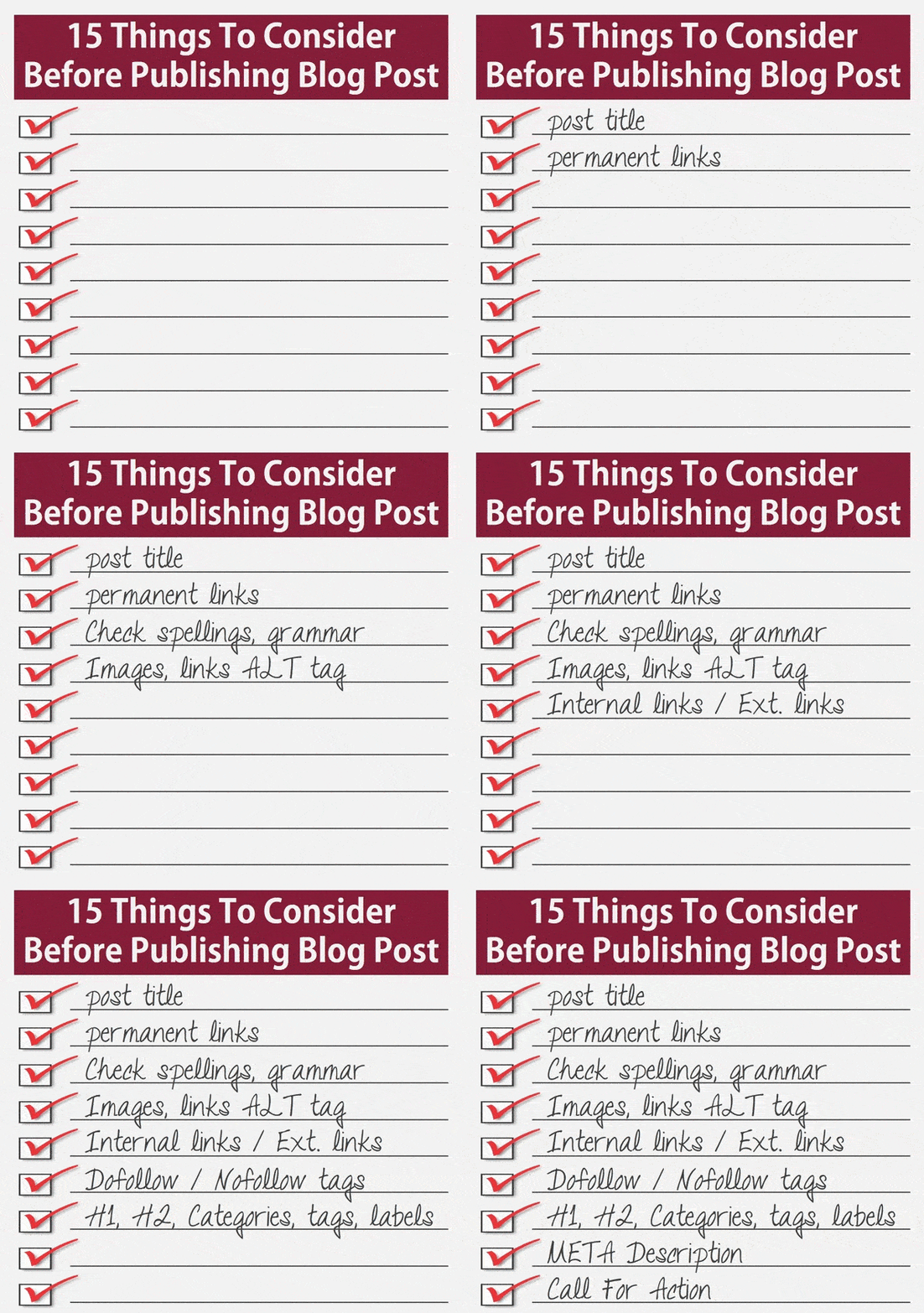
Top 15 Things To Do BEFORE Publishing A New Blog Post

So you have done with writing a quality content for all of your readers and going to publish a new blog post on your website, but wait... wait and check some important things before publishing a blog post. We are learning from how to create a blog and how to publish your writing and how to make money online. But as like the IT task management people, we also need to manage our tasks carefully ahead to publish articles online. And I'm sure, this article definitely helps you to complete following checklist items similar to the project task management software since you are managing your business blog sites, and unlike the SEO plugins this will improve the method to build websites SEO strategy. These are top 15 quick marketing steps to take BEFORE you publish a new article. No need to remember all the things, just bookmark this page as a Blog Post Checklist - you should do to every blog post BEFORE you hit PUBLISH. So this page will work just like a blog post editing service that will help to improve PageRank.
Things To Consider Before Publishing Blog Post
Last time we have seen; On-Page SEO Checklist 2016 to Boost Your PageRank. The search engine optimization is most important just like published article on writing or developing blog. Therefore, get this SEO checklist that includes 15 items you need to consider before publishing new blog posts.

Also read; 3 QuickTips To Review, Edit & Republish Old Posts To Increase Website Traffic

15 To-Dos Before Publishing New Blog Post

Wait before pressing PUBLISH button, you are not yet done, check your posts with the following most important things that will determine your article will be useful enough or truly great.

1. Check Post Title

Your post title should be catchy, attractive, beautiful, sticky and proper enough irresistible headline to convert your visitor to readers.

2. Proper permalink or permanent links

Your first 3 words of the link are the key points that decide post position in SERP.

3. Have you added high paying keywords?

Don't forget to add high paying CPC keywords as well as search related long tail keywords that will help you to bring more organic traffic.

4. Check spellings

Keep an eye on spellings. Regular spellcheck, grammar and content formatting are most important for the better online reputation. No long paragraphs and no short length content posts - keep these points in your mind.

5. Add images with ALT tag, Caption

Don't forget to add the required attributes to featured images & links as well. Also, you need to add the caption for indexing your images.

6. Add Internal Links or External links

Whenever there is a need you need to add inbound/internal links, this will surely help for better page views. Make sure all links are working properly. You can set external links to open in a new tab in SEO point of view.

7. Add dofollow tags to internal links

Don't forget to add DOFOLLOW tags for internal links.

8. Add nofollow tags to external links

Don't forget to add NOFOLLOW tags for external links.

9. Add Categories or Tags, Labels

Your post should be categorised with proper tags or labels for better navigation of new readers. This will improve user experience and so page views.

10. Add search META Description

You need to add proper and convincing meta description which will bring the user that searching on Google to directly on your page.

Also read: Online META Tag Generator | Free SEO Tool

11. Proper H1, H2 Tag, & Bold, Italic phrases.

Use heading and sub-heading from <H1> to <H3> tags to break the contents wisely. This will help search engine to prioritise your title, links to determine your content properly. Whenever you need use bold and italic phrases to get more attention to those keywords that describe the subject of the post. This will help to improve readability & SEO in On-Page web Optimization.

12. Add Jump-Link

Insert jump link properly since most of the template not support auto link.

13. If there, add AD codes

In some cases, plugins help to place ads in content automatically, but it works only when we placed ad codes properly into the content.

14. Add LOCATION to the post

If you are driving traffic from country targeting audience then you need to add proper location to each post.

15. Add Call For Comment

Last but not least, after each post you need to add some lines at the bottom of the post that will encourage readers to comment and call your regular readers to post their reviews via comments. This will improve user engagement on your site.

This is a quick checklist and I must say you need to consider these things before publishing new blog posts. If anything I have missed out, or if you want to add something to this list, you can share it via comments, I would like to add it directly to this list.

Top 500+ High PR Sites | Build SEO Quality Backlinks 2016

So you are desperately looking and searching for; Best Free High PR Dofollow Social Bookmarking Sites List for Ping submission, backlinks High PR sites for link building, High PR SEO Sites For Backlinks, High PR .Edu & .Gov Sites To Build Quality SEO Backlinks, Best Top Blogging Sites : High PR (Page Rank) for commenting, High PR Forums & Bookmarking Sites For Backlinks, List of Powerful web sites with high Page Rank or high PR sites for social bookmarking, best PR sites for SEO, how to get backlinks from high PR sites, High PR Blogs & Social Networking Sites For SEO Backlinks, then I must say, you are on PERFECT page that fulfils your requirements. SEO has changed a lot in recent few years and so the crawling of backlinks. In SEO check point of view, link building is important for website or blog success. If you have more backlinks from the high PageRank [PR] site, your search engine ranking will be definitely high. Backlinks prove to search engines that how much your website is popular in your niche. If you want to increase your PageRank, higher website traffic & optimize your blog for SEO then you must link back your blog URL to top sites as listed below. Remember; high authority backlink plays an important part for improving your website rank in SEO. If you submit your blog to more directories you will get more link back that providing more visitors to your blog/site. This is a great way to get more web traffic that your site need is by SEO with backlinks.
High PR Sites For Backlinks
Last time we have seen - 150+ Top High PR RSS Feed & Blog Submission Sites List And Directories - one of the fastest growing methods for enhancing a website traffic. But today we are going to see next important list for building quality backlinks that will pass Google SEO analysis.

Also check: 5 Ways How Wearable Technology Will Improve Our Daily Life

Backlinks - Heart Of SEO

Without backlink your website will not get a good position in SERP - search result; and will not get indexed quickly. Getting high authority backlink is not that much hard you thought, but getting proper & relevant backlinks from the relevant niche domain authority is somewhat to work for SEO. So we have listed some high authority, high PR niche site database for quality niche backlink shown below. You need to find relevant niche sites to get your proper backlink.

Why High PR Quality Backlinks Are Important?

We would like to say; if the site content is king then your links are queen. Backlinks have benefits beyond search engine result. With the help of quality Backlinks, your website will be able to get as a brand and moreover even branding authority can be gained too. Here we provided a dofollow list which has higher Google PageRank ranging from PR8 to PR5, register if they required and try to be active on those sites that will cause you to get backlinks & organic traffic as well.

200+ High PR SEO Sites For Backlinks

  1. http://www.google.com/local/add
  2. http://www.truelocal.com/
  3. http://www.local.com/default.aspx
  4. http://www.citysearch.com/
  5. http://www.yelp.com/
  6. http://www.judysbook.com/
  7. http://www.mojopages.com/
  8. http://www.ehow.com/
  9. http://www.hubpages.com/
  10. http://www.seekingalpha.com/
  11. http://www.examiner.com/
  12. http://www.ezinearticles.com/
  13. http://www.apsense.com/article/
  14. http://www.articlesbase.com/
  15. http://www.goarticles.com/
  16. http://www.squidoo.com/
  17. http://www.buzzle.com/
  18. http://www.sooperarticles.com/
  19. http://www.biggerpockets.com/
  20. http://www.technorati.com/
  21. http://www.articles.org/
  22. http://www.pubarticles.com/
  23. http://www.selfgrowth.com/
  24. http://www.brighthub.com/
  25. http://www.articlesnatch.com/
  26. http://www.artipot.com/
  27. http://www.articlesxpert.com/
  28. http://www.articlecity.com/
  29. http://www.isnare.com/
  30. http://www.textbroker.com/
  31. http://www.informationbible.com/
  32. http://www.articlesfactory.com/
  33. http://www.articlestars.com/
  34. http://www.upublish.info/
  35. http://www.infobarrel.com/
  36. http://www.articletrader.com/
  37. http://www.amazines.com/
  38. http://www.freewebsitedirectory.com/
  39. http://www.thefreelibrary.com/
  40. http://www.triond.com/
  41. http://www.EvanCarmichael.com/
  42. http://www.knoji.com/articles/
  43. http://www.articledirectoryusa.com/
  44. http://www.articlecube.com/
  45. http://www.streetarticles.com/
  46. http://www.articlecirculation.com/
  47. http://www.gather.com/
  48. http://www.thewhir.com/
  49. http://www.articlesphere.com/
  50. http://www.ezinemark.com/
  51. http://www.articlealley.com/
  52. http://www.earticlesonline.com/
  53. http://www.articledashboard.com/
  54. http://www.abcarticledirectory.com/
  55. http://www.articleclick.com/
  56. http://www.article-content-king.com/
  57. http://www.articledash.com/
  58. http://www.articlefriendly.com/
  59. http://www.articler.com/
  60. http://www.articlesafari.com/
  61. http://www.articlesaz.com/
  62. http://www.articlessubmitter.com/
  63. http://www.articleworld.net/
  64. http://www.bigarticles.com/
  65. http://www.constant-content.com/
  66. http://www.helium.com/
  67. http://www.familyfriendlysites.com/
  68. http://www.sbinformation.about.com/
  69. http://www.webpronews.com/
  70. http://www.adowp.com
  71. http://www.searchwarp.com/
  72. http://www.approvedarticles.com/
  73. http://www.articleinsider.com/
  74. http://www.directory-list.com/
  75. http://www.healthguidance.org/
  76. http://www.mpiperu.com/
  77. http://www.powerhomebiz.com/
  78. http://www.prolinkdirectory.com/
  79. http://www.weeno.com/
  80. http://www.biz-whiz.com/
  81. http://www.directorycritic.com/
  82. http://www.easyezinearticles.com/
  83. http://www.e-healthlinks.com/
  84. http://www.goodinfohome.com/
  85. http://www.homebiztools.com/
  86. http://www.kalajack.com/
  87. http://www.linksnoop.com/
  88. http://www.premierdirectory.org/
  89. http://www.realestateproarticles.com/
  90. http://www.thearticleblogs.com/
  91. http://www.webgenio.com/
  92. http://www.articles.org.in/
  93. http://www.palsra.org/
  94. http://www.bestarticless.com/
  95. http://www.article-treasure.com/
  96. http://www.articleshouse.com/
  97. http://www.the-article-directory.com/
  98. http://www.advanceranking.com/
  99. http://www.anunciosgratislosangeles.com/
  100. http://www.seosubmitarticle.com/
  101. http://www.pressreleasenews.org/
  102. http://www.localpressreleaser.org/
  103. http://www.expressrelease.in/
  104. http://www.LocalPressReleaser.net/
  105. http://www.onlinepressrelease.co/
  106. http://www.pressreleasecompany.co.uk/
  107. http://www.wordpressrelease.co.uk/
  108. http://www.cnledlights.com/
  109. http://www.articleSuggestions.com/
  110. http://www.premiumArticles.biz/
  111. http://www.hiphoparticles.info/
  112. http://www.ledtapelightinguk.com/
  113. http://www.b2bledlights.com/
  114. http://www.moz.com/
  115. http://www.talent.adweek.com/
  116. http://www.hubspot.com/
  117. http://www.socialmediatoday.com/
  118. http://www.kissmetrics.com/
  119. http://www.crazyegg.com/
  120. http://www.automotivedigitalmarketing.com/
  121. http://www.exeideas.com/
  122. http://www.insiderpages.com/
  123. http://www.yellowbot.com/
  124. http://www.citysquares.com/
  125. http://www.littleengine.com/
  126. http://www.yokld.com/
  127. http://www.lopico.com/
  128. http://www.superpages.com/
  129. http://www.bigbook.com/
  130. http://www.infospace.com/home/
  131. http://www.switchboard.com/
  132. http://www.yellowpages.com/
  133. http://www.anywho.com/yp.html
  134. http://www.yellowbook.com/
  135. http://www.magicyellow.com/
  136. http://www.dexknows.com/displayhome.ds
  137. http://www.yp.com/
  138. http://www.mapquest.com/
  139. http://www.dogpile.com/
  140. http://www.webcrawler.com/
  141. http://www.metacrawler.com/
  142. http://www.webfetch.com/
  143. http://www.tyloon.com/
  144. http://www.zoominfo.com/
  145. http://www.infousa.com/
  146. http://www.macraesbluebook.com/
  147. http://www.localeze.com/
  148. http://www.experian.com/
  149. http://www.deepdata.com/
  150. http://corporate.wcities.com/
  151. http://source.ibegin.com/
  152. http://www.universalbusinesslisting.org/
  153. http://www.dmoz.org/
  154. http://dir.yahoo.com/
  155. http://www.business.com/
  156. http://www.uncoverthenet.com/
  157. http://www.hotvsnot.com/
  158. http://www.abilogic.com/
  159. http://www.whatuseek.com/
  160. http://www.multimeta.com/
  161. http://www.joeant.com/
  162. http://www.somuch.com/
  163. http://www.webworldindex.com/
  164. http://www.bhanvad.com/
  165. http://www.onemission.com/
  166. http://www.arakne-links.com/
  167. http://www.busybits.com/
  168. http://www.chiff.com/
  169. http://www.avivadirectory.com/
  170. http://www.goguides.org/
  171. http://www.directoryworld.net/
  172. http://www.gimpsy.com/
  173. http://www.worldsiteindex.com/
  174. http://www.alivedirectory.com/
  175. http://websitespromotiondirectory.com/
  176. http://www.cannylink.com/
  177. http://www.incrawler.com/
  178. http://www.linksgiving.com/
  179. http://www.azoos.com/
  180. http://www.sunsteam.com/
  181. http://www.ask-dir.com/
  182. http://www.mastersite.com/
  183. http://www.botw.org/
  184. http://www.searchsight.com/
  185. http://www.theseoking.com/
  186. http://www.info-listings.com/
  187. http://www.thalesdirectory.com/
  188. http://www.directorygold.com/
  189. http://www.01webdirectory.com/
  190. http://www.mavicanet.com/
  191. http://www.massivelinks.com/
  192. http://www.gmdir.com/
  193. http://www.netinsert.com/
  194. http://www.skaffe.com/
  195. http://www.search-o-rama.com/
  196. http://directory.sootle.com/
  197. http://www.wowdirectory.com/
  198. http://www.clickey.com/
  199. http://www.xtlinks.com/
  200. http://www.qango.com/
  201. http://www.abifind.com/
  202. http://www.yeandi.com/
  203. http://www.cluboo.com/
  204. http://www.galaxy.com/
  205. http://www.hrwebdir.org/
  206. http://www.ozami.com/
  207. http://www.web-beacon.com/
  208. http://www.sezza.com/
  209. http://www.sevenseek.com/
  210. http://www.linkopedia.com/
  211. http://www.seekzap.com/
  212. http://www.anthonyparsons.com/
  213. http://www.ajdee.com/
  214. http://www.thisisouryear.com/
  215. http://www.funender.com/
  216. http://www.octopedia.com/
  217. http://www.azlisted.com/
  218. http://www.addurl-free.com/
  219. http://www.mostpopularsites.net/
  220. http://www.global-weblinks.com/

150+ High PR Forums & Bookmarking Sites For Backlinks

  1. http://answers.microsoft.com/en-us
  2. http://archiveoflinks.com/
  3. http://community.sitepoint.com/
  4. http://de.lirio.us/
  5. http://del.icio.us/
  6. http://dondir.com/
  7. http://filesharingtalk.com/
  8. http://forum.deviantart.com/
  9. http://forum.joomla.org/
  10. http://forums.cnet.com/
  11. http://forums.hostgator.com/
  12. http://forums.mysql.com/
  13. http://forums.searchenginewatch.com/
  14. http://simplemachines.org/community/index.php
  15. http://www.247webdirectory.com/
  16. http://www.2daydir.com/
  17. http://www.9dir.com/Submit
  18. http://www.9sites.net/
  19. http://www.9w1.net/
  20. http://www.a1webdirectory.org/
  21. http://www.abacusseo.com/
  22. http://www.abc-directory.com/
  23. http://www.abigdir.com/
  24. http://www.acewebdirectory.com/
  25. http://www.add2us.com/
  26. http://www.addbusiness.net/
  27. http://www.addlink.us/
  28. http://www.addlinkzfree.com/
  29. http://www.addsite.info/
  30. http://www.afreeurl.info/
  31. http://www.agrieducation.org/
  32. http://www.alistdirectory.com/
  33. http://www.allnicesites.com/
  34. http://www.allstatesusadirectory.com/
  35. http://www.alwayslinks.com/
  36. http://www.ananar.com/
  37. http://www.aoldir.com/
  38. http://www.archivd.com/
  39. http://www.atgear.com/
  40. http://www.auhana.com/
  41. http://www.authml.net/
  42. http://www.b2bdir.co.uk/
  43. http://www.backflip.com/
  44. http://www.baikalglobal.com/
  45. http://www.bari.biz/
  46. http://www.barksbookmarks.com/
  47. http://www.bedwan.com/
  48. http://www.bestdirectorysites.com/
  49. http://www.bestservicedirectory.com/
  50. http://www.bibsonomy.org/
  51. http://www.bigtenu.org/
  52. http://www.blahoo.net/
  53. http://www.blinklist.com/
  54. http://www.blipoo.com/
  55. http://www.blogbookmark.com/
  56. http://www.bluedot.us/
  57. http://www.blurpalicious.com/
  58. http://www.bmaccess.net/
  59. http://www.bookkit.com/
  60. http://www.bookmark-manager.com/
  61. http://www.bookmarkall.com/
  62. http://www.bookmarktracker.com/
  63. http://www.bookmax.net/
  64. http://www.botid.org/
  65. http://www.britainbusinessdirectory.com/
  66. http://www.brownlinker.com/
  67. http://www.buddymarks.com/
  68. http://www.bukmark.net/
  69. http://www.bungeebones.com/
  70. http://www.business-finder.info/
  71. http://www.businessseek.biz/
  72. http://www.bys.net/
  73. http://www.cafelaunch.com/
  74. http://www.callbuster.net/
  75. http://www.callyourcountry.com/
  76. http://www.canadafreesubmit.com/
  77. http://www.ccadv.info/
  78. http://www.cennettur.com/
  79. http://www.chicagoix.com/
  80. http://www.cipinet.com/
  81. http://www.ciqy.com/
  82. http://www.circus-do-suannes.com/
  83. http://www.citeulike.org/
  84. http://www.claimid.com/
  85. http://www.clipclip.org/
  86. http://www.cloudytags.com/
  87. http://www.codingforums.com/
  88. http://www.cogizz.com/
  89. http://www.complore.com/
  90. http://www.connectedy.com/
  91. http://www.connotea.org/
  92. http://www.contenteurope.com/
  93. http://www.contentpop.com/
  94. http://www.corank.com/
  95. http://www.criticsites.com/
  96. http://www.crowdfound.com/
  97. http://www.darkdogdesigns.com/
  98. http://www.dealdirectory.com/
  99. http://www.dearbetty.com/
  100. http://www.deeplinksdirectory.co/
  101. http://www.diamundialsinauto.org/
  102. http://www.digabusiness.com/
  103. http://www.digg.com/
  104. http://www.digitaleveuk.org/
  105. http://www.diigo.com/
  106. http://www.dropjack.com/
  107. http://www.dynn.org/
  108. http://www.easybm.com/
  109. http://www.elitesitesdirectory.com/
  110. http://www.ellysdirectory.com/
  111. http://www.enforum.net/
  112. http://www.enroll.in/
  113. http://www.eslovar.com/
  114. http://www.ewebresource.com/
  115. http://www.exospy.com/
  116. http://www.ez4u.net/
  117. http://www.favoor.com/
  118. http://www.fer-bl.org/
  119. http://www.fileindex.net/
  120. http://www.find-me-in.net/
  121. http://www.findyourlink.info/
  122. http://www.firmpay.com/
  123. http://www.flamesofc.org/
  124. http://www.folkd.com/
  125. http://www.forbfd.com/
  126. http://www.free-url-submit.com/
  127. http://www.freedirectory.ws/
  128. http://www.freedirectorysubmit.com/
  129. http://www.freelink.org/
  130. http://www.freelinkdir.com/
  131. http://www.freeprwebdirectory.com/
  132. http://www.freetoprankdirectory.com/
  133. http://www.freewebsitetemplates.com/forums
  134. http://www.freezilla.co.uk/
  135. http://www.freshtv.com/
  136. http://www.fungow.com/
  137. http://www.furl.net/learnMore.jsp
  138. http://www.gainweb.org/
  139. http://www.galyeannursery.com/
  140. http://www.gazingus.org/
  141. http://www.geekvillage.com/
  142. http://www.generalbusinesswebdirectory.com/
  143. http://www.generalshoppingdirectory.com/
  144. http://www.getboo.com/
  145. http://www.htmlforums.com/
  146. http://www.mygamebuilder.com/
  147. http://www.siteownersforums.com/
  148. http://www.siteownersforums.com/index.php
  149. http://www.v7n.com/forums/
  150. http://www.warriorforum.com/
  151. http://www.webhostingtalk.com/
  152. https://forum.filezilla-project.org/
  153. https://forum.videolan.org/
  154. https://forums.digitalpoint.com/
  155. https://www.chipmark.com/
  156. https://www.phpbb.com/

200+ High PR .Edu & .Gov Sites To Build Quality SEO Backlinks

Various types of backlinks are there including high PR domain backlinks that is .org and .edu backlinks and those are really worth more than regular .com or .net backlinks. Links from Edu & Gov Backlinks have most powerful authority and impact more for crawling your site for higher PR. Edu & Gov backlinks are particularly connected with educational & institutional related and intentionally working for government purposes. If you have a blog or a website and want to get high pagerank in Google then you need to try with these following .edu and .gov sites listed below;
  1. http://blogger.psu.edu/
  2. http://blogs.berkeley.edu/
  3. http://statemuseum.arizona.edu/
  4. http://blog.uwgb.edu/
  5. http://gsc.mit.edu/blog/
  6. http://www.career.umkc.edu/
  7. http://blogpublic.lib.msu.edu/
  8. http://www.dmu.edu/blog/
  9. http://www.amcollege.edu/
  10. http://aar.slu.edu/
  11. http://abroadblogs.newpaltz.edu/
  12. http://aceop.wvstateu.edu/
  13. http://blog.admissions.cornell.edu/
  14. http://admissions.fsu.edu/
  15. http://admissions.ncsu.edu/
  16. http://aearu.ntu.edu.tw/
  17. http://ag.arizona.edu/
  18. http://aipi.clas.asu.edu/
  19. http://aiti.mit.edu/blog/
  20. http://alg.umbc.edu/usaq/
  21. http://alumni.brandeis.edu/
  22. http://alumni.gsb.stanford.edu/
  23. http://tomprofblog.mit.edu/
  24. http://answer.rutgers.edu/blog/
  25. http://antarctica.uab.edu/blog/
  26. http://aphia.rso.siuc.edu/
  27. http://appreciativeinquiry.case.edu/
  28. http://apps.exploratorium.edu/
  29. http://apps.pathology.jhu.edu/
  30. http://archery.berkeley.edu/
  31. http://architecture.tulane.edu/
  32. http://asiahealthpolicy.stanford.edu/
  33. http://asic.union.edu/
  34. http://asunews.asu.edu/
  35. http://www.rioredstorm.com/
  36. http://atif-az.org/blog/
  37. http://auroraforum.stanford.edu/
  38. http://badgersabroad.wisc.edu/
  39. http://ballroom.union.rpi.edu/
  40. http://bases.stanford.edu/
  41. http://bcnm.berkeley.edu/
  42. http://beef.unl.edu/
  43. http://biotech.law.lsu.edu/
  44. http://blackout.gmu.edu/
  45. http://blog.case.edu/
  46. http://blog.dickinson.edu/
  47. http://blog.discoveryeducation.com/
  48. http://blog.law.cornell.edu/
  49. http://blog.lib.umn.edu/
  50. http://blog.lsc.edu/
  51. http://blog.mycology.cornell.edu/
  52. http://blog.oesd.wednet.edu/
  53. http://blog.smu.edu/
  54. http://blog.stanford.edu/
  55. http://blog.twidox.com/
  56. http://blog.usf.edu/
  57. http://blogs.adelphi.edu/
  58. http://blogs.bgsu.edu/
  59. http://blogs.bu.edu/
  60. http://blogs.cedarville.edu/
  61. http://blogs.cofc.edu/
  62. http://blogs.ei.columbia.edu/
  63. http://blogs.jhu.edu/
  64. http://blogs.law.harvard.edu/
  65. http://blogs.law.yale.edu/
  66. http://blogs.library.ucla.edu/
  67. http://blogs.lynn.edu/
  68. http://blogs.nyu.edu/
  69. http://blogs.oregonstate.edu/
  70. http://blogs.princeton.edu/
  71. http://blogs.psu.edu/
  72. http://blogs.psu.edu/blog/
  73. http://blogs.qc.cuny.edu/
  74. http://blogs.uprh.edu/
  75. http://blogs.usyd.edu.au/
  76. http://blogs.utexas.edu/
  77. http://blogs.uww.edu/
  78. http://blogs.vanderbilt.edu/
  79. http://blogs.wesleyan.edu/
  80. http://blogsforlearning.msu.edu/
  81. http://boinc.berkeley.edu/
  82. http://bookstore.esc.edu/
  83. http://boredshit.com/
  84. http://bostonreview.mit.edu/
  85. http://bostonreview.net/
  86. http://bpa.odu.edu/
  87. http://bschool.pepperdine.edu/
  88. http://bschool.washington.edu/
  89. http://buffy.infodiv.unimelb.edu.au/
  90. http://bus.utk.edu/
  91. http://business.fiu.edu/
  92. http://byuracing.byu.edu/
  93. http://ca.htc.mnscu.edu/
  94. http://www-cyanosite.bio.purdue.edu/
  95. http://www-personal.umich.edu/
  96. http://www-rcf.usc.edu/
  97. http://www-u.life.uiuc.edu/
  98. http://www.accc.uic.edu/
  99. http://www.accd.edu/
  100. http://www.aces.uiuc.edu/
  101. http://www.acesalumni.illinois.edu/
  102. http://www.actlab.utexas.edu/
  103. http://www.agbioforum.missouri.edu/
  104. http://www.alliance.rice.edu/
  105. http://www.alpstech.edu.ph/
  106. http://www.alumnae.mtholyoke.edu/
  107. http://www.alumni.appstate.edu/
  108. http://www.americansentinel.edu/
  109. http://www.amrita.edu/
  110. http://www.anc.edu/
  111. http://www.anderson.edu/
  112. http://www.andrews.edu/
  113. http://www.antiochla.edu/
  114. http://www.apam.columbia.edu/
  115. http://www.appa.edu/
  116. http://www.arl.psu.edu/
  117. http://www.artcenter.edu/
  118. http://www.brookings.edu/
  119. http://blogs.oc.edu/
  120. http://smude.edu.in/
  121. http://blogs.fit.edu/
  122. http://blogs.providence.edu/
  123. https://www.health.harvard.edu/
  124. http://ncccblog.americorps.gov/
  125. http://blog.nyiad.edu/
  126. http://blogs.babson.edu/
  127. http://jdunn.journalism.cuny.edu/
  128. http://blog.westwood.edu/
  129. http://ipep.arizona.edu/
  130. http://blogs.oberlin.edu/
  131. http://www.rasmussen.edu/
  132. http://blogs.hanover.edu/
  133. http://www.stevenshenager.edu/
  134. http://healthsciences.utah.edu/
  135. http://blog.online.colostate.edu/
  136. http://id.ome.ksu.edu/
  137. https://open.umich.edu/
  138. http://community.ashworthcollege.edu/
  139. http://www.bi.edu/
  140. http://tbirdonline.thunderbird.edu/
  141. http://startup.nujs.edu/
  142. http://blog.peirce.edu/
  143. http://www.rowan.edu/
  144. http://www.calmu.edu/
  145. http://pty.vanderbilt.edu/
  146. http://www.ise.ufl.edu/
  147. http://pasadena.paulmitchell.edu/
  148. http://www.cc-sd.edu/
  149. http://onlinelaw.wustl.edu/
  150. http://msw.usc.edu/
  151. http://onlinegrad.marygrove.edu/
  152. http://onlinemba.unc.edu/
  153. http://condor.depaul.edu/
  154. http://www.independence.edu/
  155. http://www.baystate.edu/
  156. http://warner.edu/
  157. http://info.princeinstitute.edu/
  158. http://www.evergreenbeauty.edu/
  159. http://cps.regis.edu/
  160. http://ui.asu.edu/
  161. http://news.vanderbilt.edu/
  162. http://blog.mountunion.edu/
  163. http://blogs.broadviewuniversity.edu/
  164. http://promo.unm.edu/
  165. http://www.slu.edu/
  166. http://www.rowan.edu/sem/admissions/
  167. http://blog.antiochschool.edu/
  168. http://www.aspen.edu/
  169. http://info.waynesburg.edu/
  170. http://blog.usaid.gov/
  171. http://healthcare.utah.edu/
  172. http://hub.jhu.edu/
  173. http://infospace.ischool.syr.edu/
  174. http://cw.ua.edu/
  175. http://www.umsystem.edu/
  176. http://cedars.cedarville.edu/
  177. http://blog.post.edu/
  178. http://exec.tuck.dartmouth.edu/
  179. http://bookhaven.stanford.edu/
  180. http://blog.online.saintleo.edu/
  181. http://www.wgu.edu/
  182. http://ironline.american.edu/
  183. http://forbes.house.gov/
  184. http://www.impact.upenn.edu/
  185. http://blogs.cwsl.edu/
  186. http://blog.methodistcollege.edu/
  187. http://blog.eap.ucop.edu/
  188. http://blogs.darden.virginia.edu/
  189. http://morainepark.edu/
  190. http://www.edublogs.org/
  191. http://www.academia.edu/
  192. http://www.schoolrack.com/
  193. http://www.futureofeducation.com/
  194. http://www.community.eflclassroom.com/
  195. http://oregonstate.edu/
  196. http://www.uta.edu/
  197. http://ksdt.ucsd.edu/
  198. http://djclub.ucsd.edu/
  199. http://forum.portal.edu.ro
  200. http://forum.gov-zakupki.ru/
  201. http://forum.loni.ucla.edu/
  202. http://forum.portal.edu.ro/
  203. http://forum.tcs.uj.edu.pl/
  204. http://forums.saa.edu/
  205. http://fsec.ucf.edu/
  206. http://ftp.itcs.tsinghua.edu.cn/
  207. http://green.chem.cmu.edu/
  208. http://h2o.law.harvard.edu/
  209. http://hlurb.gov.ph/forum/
  210. http://home.khjh.hc.edu.tw/
  211. http://hunstem.uhd.edu/
  212. http://ilab.usc.edu/
  213. http://ip.wsz.edu.pl/
  214. http://ipv6bbs.zju.edu.cn/
  215. http://itcs.tsinghua.edu.cn/
  216. http://lc.hkbu.edu.hk/te/
  217. http://leadingvoices.lipscomb.edu
  218. http://linux.lses.tp.edu.tw/
  219. http://lms.auaf.edu.af/
  220. http://ltrc.tnc.edu.tw/
  221. http://mydragonnet.hkis.edu.hk/
  222. http://notable.math.ucdavis.edu/
  223. http://og.cs.okstate.edu/
  224. http://organizations.db.erau.edu/
  225. http://pluto.potsdam.edu/
  226. http://sbs.oeiizk.edu.pl/
  227. http://school41.edu.ru/
  228. http://sg.mededu.miami.edu/
  229. http://stu.hksyu.edu/
  230. http://sukurs.edu.pl/forum/
  231. http://sweb.uky.edu/
  232. http://thpt-trannguyenhan-hp.edu.vn/
  233. http://tps.ccit.arizona.edu/
  234. http://uct.edu.vn/
  235. http://ufrb.edu.br/
  236. http://upzmg.edu.mx/
  237. http://wagnerpedia.wagner.edu/

140+ High PR Blogs & Social Networking Sites For SEO Backlinks

  1. http://answers.microsoft.com/
  2. http://answers.yahoo.com/
  3. http://blog.linkedin.com/
  4. http://blogs.botw.org/
  5. http://contributor.yahoo.com/
  6. http://en.gravatar.com/
  7. http://en.wikipedia.org/wiki/Main_Page
  8. http://ireport.cnn.com/
  9. http://plus.google.com/
  10. http://portal.eatonweb.com/
  11. http://profile.yahoo.com/
  12. http://technorati.com/blogs/directory/
  13. http://vids.myspace.com/
  14. http://www.about.me/
  15. http://www.actsascommunity.com/
  16. http://www.alexa.com/
  17. http://www.ask.fm/
  18. http://www.bakespace.com/
  19. http://www.beautifulsociety.com/
  20. http://www.biggerblogger.com/
  21. http://www.bizsugar.com/
  22. http://www.blip.tv/
  23. http://www.blogarama.com/
  24. http://www.blogcatalog.com/
  25. http://www.blogdigger.com/index.html
  26. http://www.blogflux.com/
  27. http://www.bloggapedia.com/
  28. http://www.blogged.com/
  29. http://www.bloggeries.com/
  30. http://www.bloggernity.com/
  31. http://www.bloggingfusion.com/
  32. http://www.bloghints.com/
  33. http://www.blogio.net/
  34. http://www.bloglisting.net/
  35. http://www.blogpulse.com/
  36. http://www.blogsearchengine.com/
  37. http://www.bloguniverse.com/
  38. http://www.break.com/
  39. http://www.brightcove.com/
  40. http://www.britblog.com/
  41. http://www.castpost.com/
  42. http://www.causecast.org/
  43. http://www.clipchef.com/
  44. http://www.clipmarks.com/
  45. http://www.clipmoon.com/
  46. http://www.closetcouture.com/
  47. http://www.colourlovers.com/
  48. http://www.communityengine.org/
  49. http://www.crunchbase.com/
  50. http://www.dailymotion.com/
  51. http://www.delicious.com/
  52. http://www.deviantart.com/
  53. http://www.disqus.com/
  54. http://www.dotv.com/
  55. http://www.etsy.com/
  56. http://www.famster.com/
  57. http://www.flickr.com/
  58. http://www.flickr.com/people/
  59. http://www.flixya.com/
  60. http://www.footnote.com/
  61. http://www.foursquare.com/
  62. http://www.friendfeed.com/
  63. http://www.gamerdna.com/
  64. http://www.gawkk.com/
  65. http://www.genlighten.com/
  66. http://www.globeofblogs.com/
  67. http://www.gofish.com/
  68. http://www.goodreads.com/
  69. http://www.grindtv.com/
  70. http://www.growthhackers.com/
  71. http://www.humblevoice.com/
  72. http://www.identi.ca/
  73. http://www.ifilm.com/
  74. http://www.inbound.org/in/
  75. http://www.instagram.com/
  76. http://www.kewego.com/
  77. http://www.klout.com/
  78. http://www.last.fm/
  79. http://www.librarything.com/
  80. http://www.linkedin.com/
  81. http://www.list.ly/
  82. http://www.livejournal.com/
  83. http://www.liveleak.com/
  84. http://www.lovdbyless.com/
  85. http://www.lulu.tv/
  86. http://www.mashable.com/
  87. http://www.meravideo.com/
  88. http://www.metacafe.com/
  89. http://www.mixx.com/
  90. http://www.motorsportmad.com/
  91. http://www.myheavy.com/
  92. http://www.myspace.com/
  93. http://www.ontoplist.com/
  94. http://www.pandora.tv/
  95. http://www.paper.li/
  96. http://www.photobucket.com/
  97. http://www.pinterest.com/
  98. http://www.polyvore.com/
  99. http://www.porkolt.com/
  100. http://www.putfile.com/
  101. http://www.quora.com/
  102. http://www.reddit.com/
  103. http://www.scoop.it/u/
  104. http://www.scribd.com/
  105. http://www.sett.com/
  106. http://www.shelfari.com/
  107. http://www.slashdot.org/
  108. http://www.slideshare.net/
  109. http://www.spillbean.com/
  110. http://www.stackexchange.com/
  111. http://www.stockvault.net/
  112. http://www.stumbleupon.com/
  113. http://www.stupidvideos.com/
  114. http://www.superglued.com/
  115. http://www.teacherswithoutborders.org/
  116. http://www.thatshow.com/
  117. http://www.tubetorial.com/
  118. http://www.viddler.com/
  119. http://www.videowebtown.com/
  120. http://www.vidmax.com/
  121. http://www.vimeo.com/
  122. http://www.visual.ly/users/
  123. http://www.vmix.com/
  124. http://www.wikia.com/Wikia
  125. http://www.wordpress.com/
  126. http://www.wordpress.org/
  127. http://www.xanga.com/
  128. http://www.youtube.com/
  129. http://www.zippyvideos.com/
  130. http://wwww.technorati.com/
  131. https://productforums.google.com/forum/#!forum/en
  132. https://www.blogger.com/
  133. https://www.delicious.com/
  134. https://www.diigo.com/user/
  135. https://www.facebook.com/
  136. https://www.facebook.com/notes/
  137. https://www.flipboard.com/
  138. https://www.google.com/+/business/
  139. https://www.medium.com/
  140. https://www.myfav.es/
  141. https://www.myspace.com/
  142. https://www.rebelmouse.com/
  143. https://www.soundcloud.com/
  144. https://www.svbtle.com/
  145. https://www.tumblr.com/
  146. https://www.twitter.com/
  147. https://www.vimeo.com/

Bottom Line

Backlinks are very important for every Blog or Websites. If you want your blog or site to rank high in Google result pages, you have to have lots of backlinks, from quality sites. But before applying above links, just remember; building a few of the quality link backs, from the quality places is more valuable than building 1000 links from the wrong places. Getting high-quality backlinks from the high PR websites help blogs to improve PageRank easily that causing more search traffic & ultimately more revenue.

If you like this sites list; please share on social networking sites and start submitting your blog to few high PageRank websites to get dofollow backlinks for free. If you have any other high PR dofollow backlinks which belong to as above, then feel free to share with us via comments, we would love to place it in above list.

NOTE: This post doesn't encourage to go and spam your comments in above-mentioned sites or forums. Keep in mind to follow the respective policies always. Only if there is a requirement, go and share your backlink and explain your relevant content on those sites else it will cause the negative impact on your SEO.

Social Tags: #Backlinks #Pagerank #SERP # SEO #Google

Kategori

Kategori